WordPress SEO Tools 2025
TL; DR: To truly master WordPress SEO in 2025, go beyond basic plugins and leverage professional, standalone WordPress SEO tools like Ahrefs, Semrush, Screaming Frog, Surfer SEO, and AnswerThePublic for comprehensive competitive analysis, technical audits, content optimization, and audience understanding, all while measuring ROI and adapting to the AI-driven search landscape.
These are the tools behind our wordpress seo services, and none of them replaces the judgement of using them.
Table of Contents
- Introduction: Beyond Plugins – The Professional’s Toolkit for WordPress SEO
- Part 1: The All-in-One Powerhouses: Ahrefs vs. Semrush for WordPress Dominance
- Part 2: The Technical SEO Workhorse: Mastering Screaming Frog for WordPress
- Part 3: The Content Optimization Champion: Using Surfer SEO with WordPress
- Part 4: The Audience Insight Engine: Uncovering Intent with AnswerThePublic
- Part 5: From Data to Dollars: Measuring SEO ROI and CRO for WordPress
- Part 6: Your 2025 WordPress SEO Workflow: Putting It All Together
- Frequently Asked Questions (People Also Ask)
- Conclusion: Your Blueprint for SEO Success
What Are WordPress SEO Tools?
The wordpress seo tools are specialized plugins and software designed to optimize websites built on the WordPress platform, helping them rank higher on search engine results pages (SERPs). These tools streamline tasks such as keyword optimization, content analysis, link building, and performance tracking, making it easier for website owners to enhance visibility and drive organic traffic. By automating technical SEO aspects, such as sitemap creation, meta tag management, and mobile optimization, these tools save time and enhance user experience.
Specific Benefits:
- Increased search engine rankings.
- Improved site performance.
- Actionable insights into visitor behavior.
- Empowering businesses and bloggers to reach broader audiences effectively.
The Professional’s WordPress SEO Tools
For years, the conventional wisdom surrounding WordPress SEO has been deceptively simple: install a good plugin, fill in the blanks, and watch the traffic roll in. Many website owners believe that achieving search engine dominance is a matter of choosing between Yoast, Rank Math, or All-in-One SEO. While these plugins are undeniably essential for foundational on-page optimization, this belief represents a dangerous oversimplification in the hyper-competitive digital landscape of 2025.
Professional-grade results—the kind that capture market share, drive meaningful revenue, and build lasting brand authority—are not forged in the settings panel of a plugin. They are engineered through deep, data-driven analysis, meticulous technical refinement, and strategic content execution. This level of mastery requires a different class of tools: powerful, standalone SEO software platforms that operate outside the WordPress dashboard, providing an unvarnished view of your website’s performance and your competitors’ strategies.
The 2025 SEO Landscape: A New Era of Complexity
The ground beneath our feet is shifting. The “old SEO playbook,” as Backlinko notes, is no longer effective. We are contending with a confluence of transformative forces that demand a more sophisticated approach:
- The Rise of AI Overviews: Google’s integration of generative AI into search results, now known as AI Overviews (AIOs), is fundamentally altering user behavior. These AI-generated summaries appear at the top of the SERP, answering queries directly and reducing the need for users to click through to websites. With AIOs appearing in up to 47% of Google searches and their presence growing by a staggering 115% since the March 2025 core update, the era of “zero-click searches” is accelerating. Organic clicks are being squeezed, making every ranking position more valuable and every click harder to earn.
- The Crystallization of User-Centric SEO: The long-predicted shift from keyword-focused to user-focused optimization has now fully materialized. As WordStream highlights, success in 2025 hinges on addressing user intent and answering the granular, complex questions users now ask. It’s no longer about stuffing a page with an exact-match keyword; it’s about understanding the context, the “why” behind the search, and providing a comprehensive, authoritative answer. This is a world where E-E-A-T (Experience, Expertise, Authoritativeness, and Trustworthiness) is not just a guideline but a prerequisite for visibility.
- Escalating Technical Demands: Core Web Vitals are no longer a “nice-to-have” but a critical ranking factor directly impacting user experience and, consequently, search performance. As Delicious Brains points out, optimizing for metrics such as Largest Contentful Paint (LCP), Interaction to Next Paint (INP), and Cumulative Layout Shift (CLS) is crucial. Furthermore, the increasing complexity of site architecture, JavaScript rendering, and international SEO requires diagnostic tools that can crawl and analyze a website with the same rigor as Google’s own crawler, Googlebot.
Clarifying the Scope: Why Standalone Tools Are Non-Negotiable
This guide deliberately and emphatically steps outside the WordPress ecosystem. According to the specific requirements of this analysis, we will not be discussing WordPress plugins such as Yoast, Rank Math, or their contemporaries. While they excel at implementing on-page elements like meta tags, sitemaps, and schema markup, they are fundamentally limited in their capabilities. They operate within the confines of your own site, lacking the external perspective and competitive intelligence necessary for true market domination.

Standalone SEO software—platforms like Ahrefs, Semrush, and Screaming Frog—are the professional ‘s toolkit. They are the telescopes, microscopes, and diagnostic scanners of the SEO world. They allow you to:
- Analyze the Entire Competitive Landscape: See exactly which keywords your competitors rank for, which pages drive their traffic, and where their most powerful backlinks come from.
- Conduct Deep Technical Audits: Crawl every single URL on your site to uncover hidden issues, such as broken links, redirect chains, duplicate content, and crawlability errors that plugins may not detect.
- Uncover Data-Driven Content Opportunities: Move beyond guesswork by analyzing what’s already working on Google and engineering content that is demonstrably better.
- Measure What Matters: Connect SEO efforts directly to business outcomes by tracking conversions, traffic value, and, most importantly, Return on Investment (ROI).
These tools provide the deep analytical power needed to diagnose and fix the core engineering of your website’s search presence, turning SEO from a checklist of tasks into a strategic business function.
What You’ll Learn in This Guide
This report is structured to be the most comprehensive guide ever written on using standalone tools to achieve WordPress SEO success. We will navigate this complex landscape with a clear, logical progression:
- The All-in-One Powerhouses: We start with a granular, head-to-head comparison of the two industry titans, Ahrefs and Semrush, to help you choose the central nervous system for your SEO strategy.
- The Technical Workhorse: We’ll provide a step-by-step masterclass on using Screaming Frog to perform a forensic-level technical audit of your WordPress site.
- The Content Champion: We’ll explore how to utilize data-driven content optimization tools, such as Surfer SEO, to craft articles that are specifically designed to rank.
- The Audience Insight Engine: We’ll uncover how to use tools like AnswerThePublic to tap directly into the mind of your audience and fuel your content strategy with real user questions.
- From Data to Dollars: In a crucial final section, we will demystify the process of measuring the ROI of your SEO efforts, providing a framework to prove the financial value of your investment in these tools and strategies.
- The Unified Workflow: Finally, we will synthesize everything into a single, actionable workflow, showing you how to integrate these powerful tools into a cohesive, ongoing optimization process.
Prepare to move beyond the basics. This is your blueprint for transforming your WordPress site from just another blog into a dominant force on Google.
Part 1: The All-in-One Powerhouses: Ahrefs vs. Semrush for WordPress Dominance
At the heart of any serious SEO campaign lies a central command center—a comprehensive suite of tools that provides intelligence on every front, from keyword discovery to competitive analysis and technical health. In the world of SEO, two names stand above all others in this category: **Ahrefs** and **Semrush**. Choosing between them is one of the most critical decisions a website owner or agency will make, as it shapes the entire workflow, data interpretation, and strategic focus of their efforts. This section provides a detailed, comparative analysis to help you determine which of these titans is the best fit for your WordPress site’s journey to the top of the SERPs.
Introduction to the Titans
Both Ahrefs and Semrush are marketed as “all-in-one” SEO platforms, but they evolved from different core strengths, and these origins still influence their modern-day philosophies. Understanding this distinction is key to making the right choice.
Semrush began its life with a strong focus on competitive intelligence, particularly in keyword research for both organic and paid search (PPC). Over the years, it has evolved into a comprehensive digital marketing suite comprising over 50 distinct tools, covering SEO, content marketing, social media management, and advertising. As Exploding Topics notes, it’s the top recommendation for those pursuing a multi-channel marketing approach. Its strength lies in its sheer breadth of features and its ability to connect disparate marketing activities under one roof.
Ahrefs, conversely, built its formidable reputation on the back of its backlink analysis tool, which is widely considered the industry’s gold standard. Its development has been more SEO-centric, focusing on perfecting the core pillars of keyword research, site auditing, and rank tracking. Reviewers consistently praise Ahrefs for its clean, streamlined interface and its laser focus on providing deep, actionable SEO insights. It is often the preferred tool for SEO specialists and content marketers who prioritize depth in core SEO functions over breadth across the entire digital marketing landscape.
For a WordPress site owner, the choice isn’t simply about which tool is “better,” but which tool’s philosophy and feature set best align with their specific goals, technical expertise, and business model.
Feature-by-Feature Showdown
To truly understand the differences, we must dissect each platform’s core functionalities and analyze their application in a WordPress context. The following table provides a high-level overview, which we will then explore in granular detail.
| Table 1: High-Level Comparison of Ahrefs vs. Semrush (2025) | |||
| Semrush | Ahrefs | The Verdict for WordPress Users | |
|---|---|---|---|
| Core Focus | All-in-one digital marketing suite (SEO, PPC, Content, Social) | SEO-focused suite with best-in-class backlink data | Semrush for holistic marketing, and Ahrefs for a pure SEO focus. |
| Keyword Research | Massive database (25.3B+), strong PPC data integration, AI-powered topic clustering. | Excellent for organic growth, the “Traffic Potential” metric is great for content ideation. | Semrush has a slight edge due to its larger data volume and PPC insights. |
| Backlink Analysis | Strong, with a unique Backlink Gap tool and toxicity scores. | Often considered the industry gold standard for data size and accuracy. | Ahrefs is the specialist and is generally preferred for this task. |
| Site Audit | Extremely comprehensive (140+ checks), including Core Web Vitals, HTTPS, and AI Search readiness. | Solid and user-friendly (170+ checks), outstanding for common issues, but lacks some of Semrush’s advanced checks. | Semrush is more robust for deep technical audits, especially for complex WordPress sites. |
| Rank Tracking | More frequent updates (daily), tracks across multiple search engines (incl. ChatGPT). | Accurate, but updates are less frequent (weekly on some plans). Tracks Google only. | Semrush wins for frequency and multi-platform tracking. |
| User Interface | Comprehensive but can have a steep learning curve due to its ~50 sub-sections. | Widely praised for being clean, intuitive, and easy to navigate. | Ahrefs is more beginner-friendly and less overwhelming. |
| Unique Features | Content Marketing Toolkit, Social Media Toolkit, and Local SEO tools. | Content Explorer, “Top Pages” for link analysis, unlimited verified projects. | Depends on need: Semrush for local businesses, Ahrefs for agencies managing many sites. |
Keyword Research: Fueling Your WordPress Content Engine
Keyword research is the bedrock of any SEO strategy. It’s not just about finding terms; it’s about understanding intent, assessing competition, and building a content architecture that captures valuable traffic.
Semrush‘s approach is defined by scale and integration. Its Keyword Magic Tool draws from a database of over 25 billion keywords, providing unparalleled depth and breadth. A key advantage for businesses that run ads is their seamless integration of SEO and PPC data. You can view a keyword’s organic difficulty alongside its Cost-Per-Click (CPC) value, helping you identify commercially valuable terms that may be viable to target organically. As Backlinko points out, analyzing keywords that competitors consistently invest in is a powerful way to identify profitable SEO opportunities. Furthermore, Semrush’s AI-driven features, such as automated topic cluster generation, can help a WordPress site owner quickly map out a content hub strategy, identifying pillar pages and related subtopics to establish topical authority.
Ahrefs, while also possessing a massive database, focuses its Keywords Explorer tool more squarely on organic content creators. It introduces unique and highly practical metrics like “Traffic Potential,”; which estimates the total traffic a top-ranking page receives from all the keywords it ranks for, not just the single keyword you entered. This gives a much more realistic picture of a topic’s value. Its “also rank for” and “Questions” reports are invaluable for WordPress bloggers looking to create comprehensive articles that cover a topic from every angle, directly addressing user intent and increasing the chances of capturing featured snippets or appearing in “People Also Ask” boxes.
WordPress Application: Imagine you run a WordPress blog about home coffee brewing.
1. With Semrush: You could use the Keyword Magic Tool to find keywords related to “espresso machine.” You filter by “Transactional” intent and a high CPC to find terms like “best espresso machine under $500.” You notice competitors are bidding heavily on this term, validating its commercial value. You then use the topic cluster tool to build out a content plan around the central “Espresso Machine” pillar page, with articles on “how to clean an espresso machine,” “espresso machine vs moka pot,” etc.
2. With Ahrefs: You enter “espresso machine” into Keywords Explorer. You see the top-ranking page has a Traffic Potential of 50,000 visits/month, far more than the search volume for the head term alone. You click on that page in Site Explorer to see all the long-tail keywords it ranks for. You use the “Questions” report to find “what kind of coffee to use for espresso machine” and “is it worth getting an espresso machine,” using these to build out your FAQ section and H2 headings, ensuring your article is more comprehensive than the competition. You also find the comparison keyword “AeroPress vs espresso,” which Backlinko identifies as a high-intent, low-competition opportunity.
Backlink Analysis: Building Authority for Your WordPress Site
Backlinks remain a cornerstone of Google’s algorithm. A tool’s ability to accurately map the web’s link graph is crucial for competitive analysis and effective link-building strategies.
Ahrefs is the undisputed champion in this arena for many SEO professionals. Its reputation is built on the size and freshness of its backlink index, which is powered by the web’s second-most active crawler after Google itself. Reviewers often call it the “industry gold standard” for backlink intelligence. Features like its **Content Explorer** are brilliant for link building; you can find mentions of a topic that don’t yet link to you, providing a warm outreach opportunity. Analyzing a competitor’s “Top pages by links” in Site Explorer is the fastest way to understand what kind of content attracts authoritative links in your niche.
Semrush offers a very capable **Backlink Analytics** tool, but its unique strength lies in its strategic features. The **Backlink Gap** tool is a standout, allowing you to enter your domain and up to four competitors to instantly see which websites are linking to them but not to you. This is a ready-made list of high-value link-building targets. Semrush also provides a “Toxicity Score” to help identify potentially harmful links that might warrant disavowal, a useful feature for WordPress sites that have been targeted by negative SEO attacks.
WordPress Application: You want to build links to your WordPress travel blog.
1. With Ahrefs: You identify a top-ranking competitor blog. Using Site Explorer, you go to their “Best by links” report and find they have a highly-linked-to article titled “10 Essential WordPress Plugins for Travel Bloggers.” This tells you that “how-to” guides and resource lists are effective link magnets in your niche. You decide to create a more comprehensive “Ultimate Guide to 25 Essential Tools for Travel Bloggers in 2025,” including both plugins and standalone software.
2. With Semrush: You use the Backlink Gap tool, inputting your blog and three competitors. The tool reveals that all three competitors have links from major travel publications like Lonely Planet and Condé Nast Traveler, but you don’t. You analyze the specific pages these publications are linking to and discover they are all data-driven studies (e.g., “The Most Affordable European Cities for Digital Nomads”). This insight informs your content strategy to focus on creating original research to attract high-authority links.
Site Audit: Ensuring Your WordPress Site’s Technical Health
A technically sound website is the foundation upon which all other SEO efforts are built. Common WordPress issues, such as plugin conflicts, slow image loading, and improper categorization, can create a complex web of technical SEO problems.
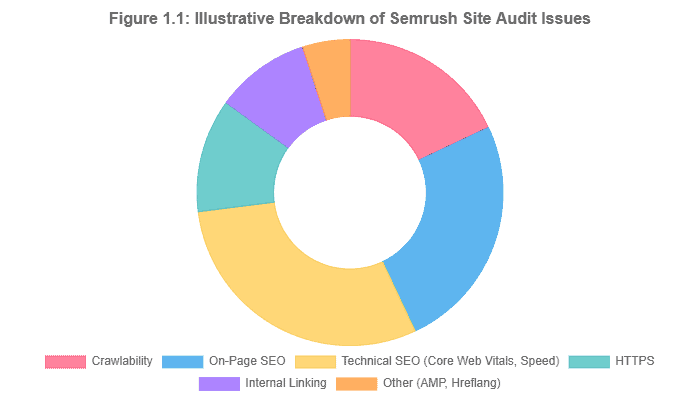
Semrush’s Site Audit is comprehensive, boasting over 140 specific checks. It excels at identifying complex issues. Its thematic reports on Core Web Vitals, HTTPS implementation, and International SEO (hreflang) are exceptionally robust. Crucially for 2025, it has already introduced checks for AI Search optimization, such as looking for missing or incorrect `llms.txt` files. One review highlights that Semrush is better at identifying issues, such as keyword cannibalization, and prioritizes them based on their potential impact. Its categorization of issues into “Errors” (most severe), “Warnings,” and “Notices” provides a clear action plan.
Figure 1.1: Illustrative breakdown of issues found by a Semrush Site Audit on a typical WordPress site, highlighting the tool’s comprehensive checks across different categories.
Ahrefs’ Site Audit is also very powerful, checking for over 170 technical SEO issues. It is often praised for its clean, fast, and intuitive interface, which can make the daunting task of a technical audit feel more manageable. It provides a clear “Health Score” and visualizes data effectively, making it easy to track improvements over time. While it covers all the critical bases, such as broken links, duplicate content, and missing metadata, some expert reviews note that it lacks some of the highly specialized checks found in Semrush, including log file analysis and the same depth of AMP validation.
WordPress Application: Your WordPress e-commerce site is underperforming.
1. With Semrush: You run a Site Audit. The report flags “Critical” errors related to Core Web Vitals, specifically a poor LCP score on your product pages. It drills down and identifies that unoptimized, full-size product images uploaded via the WordPress media library are the culprit. It also issues a “Warning” for duplicate content, showing that your WordPress category and tag archives for “Men’s Shoes” are creating two near-identical pages, potentially confusing Google.
2. With Ahrefs: The Site Audit gives you a Health Score of 75%. It quickly identifies all 404 errors from old products you deleted without setting up redirects. The “Content” report flags pages with low word count, helping you identify thin product descriptions that need to be fleshed out. Its clear visualization of internal link structure helps you see that your most important product category pages aren’t receiving enough internal link equity from your blog posts.
Rank Tracking, User Interface, and Pricing
The final decision often comes down to usability and budget.
Rank Tracking: Semrush has the edge here. It provides daily updates, which are essential for monitoring volatility following an algorithm update or a significant site change. It also tracks rankings across multiple search engines, including Bing, as well as AI platforms like ChatGPT, which is a forward-thinking feature. Ahrefs’ tracker is accurate, but it updates less frequently (as little as weekly on some plans) and is primarily focused on Google.
User Interface (UI): This is Ahrefs’ home run. Its interface is consistently lauded for being clean, logical, and focused. It’s less intimidating for newcomers and enables experienced SEOs to quickly find the data they need. Semrush, with its vast array of tools, can be overwhelming to a new user. One reviewer described its UX as “confusing as ever,” with nearly 50 different sub-sections in the navigation.
Pricing & Value Proposition (Updated for 2025): Both tools are premium investments and have seen price increases. It’s crucial to check their official pricing pages for the most up-to-date information, as plans and limits are subject to frequent changes.
| Table 2: Estimated 2025 Pricing Comparison – Ahrefs vs. Semrush (Entry/Mid-Tier) | |||||
| Platform | Entry-Level Plan | Approx. Monthly Price (USD) | Mid-Tier Plan | Approx. Monthly Price (USD) | Key Differentiator |
|---|---|---|---|---|---|
| Ahrefs | Lite | $129 | Standard | $249 | Focus on core SEO data and a clean UI. Lower-tier plans may have a restrictive credit system in place. A hidden “$29/month Starter plan” exists with heavy limitations. |
| Semrush | Pro | $139.95 | Guru | $249.95 | Broader feature set (PPC, Social), more frequent rank tracking, and advanced auditing. Often, there are more features for a similar price. |
| Note: Prices are based on available data from mid-2025 and are subject to change. Annual billing typically offers a discount. | |||||
A key value proposition for Ahrefs is that it allows tracking of an unlimited number of verified domains, making it highly cost-effective for agencies or freelancers managing many WordPress sites they own or have GSC access to.
The Verdict: Which One for Your WordPress Site?
There is no single “best” tool. The optimal choice is entirely dependent on your specific context.
Choose Semrush if:
- You are a business owner or marketer who needs a **holistic digital marketing platform**. You manage both SEO and PPC campaigns and want to see how they interact.
- Your WordPress site is for a **local business**. Semrush’s dedicated Local SEO tools give it a significant advantage for managing listings and regional rankings.
- You demand the **most comprehensive technical site audit** available in an all-in-one suite, with a focus on future-proofing for things like AI search.
- You need **daily rank tracking** or want to monitor your visibility on platforms beyond Google.
Choose Ahrefs if:
- Your primary, and perhaps only, focus is **core SEO**. You live and breathe backlinks, keyword research, and organic content strategy.
- You value a **clean, intuitive, and fast user interface** above all else. You want to get to the data you need with minimal friction.
- You are an agency or freelancer who manages a large portfolio of WordPress sites that you can verify, making the unlimited projects feature a significant cost-saver.
- Your strategy is heavily reliant on **content marketing and link building**, and you want the best-in-class tool for analyzing competitor content and backlink profiles.
Key Takeaways: Ahrefs vs. Semrush
- Philosophy: Semrush is a broad digital marketing suite; Ahrefs is a deep, SEO-focused toolkit.
- Strengths: Semrush excels in the breadth of keyword research, PPC integration, and the depth of technical audit. Ahrefs is the leader in backlink analysis and user interface design.
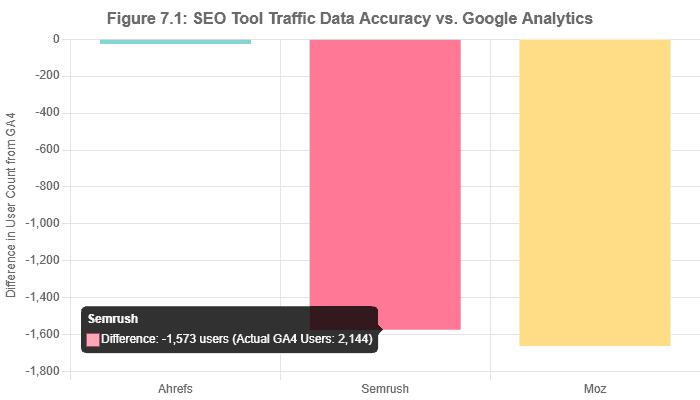
- Data Accuracy: While all tools use estimates, one independent test showed that Ahrefs’ traffic data was significantly closer to Google Analytics than that of Semrush or Moz, a crucial point for data purists.
- The Choice: Your decision should be based on your primary role. Are you a holistic marketer (Semrush) or an SEO specialist (Ahrefs)?
Part 2: The Technical Search Engines Workhorse: Mastering Screaming Frog for WordPress
While all-in-one platforms like Ahrefs and Semrush provide excellent high-level site audits, there are times when you need to go deeper. For forensic-level technical analysis, site migrations, and complex issue diagnosis, professionals turn to a specialized tool: the **Screaming Frog SEO Spider**. This section provides a definitive guide to leveraging this powerful desktop crawler for conducting a thorough technical SEO audit, specifically for WordPress websites, and uncovering problems that other tools might miss.
What is Screaming Frog?
Screaming Frog SEO Spider is a desktop-based website crawler, available for Windows, macOS, and Ubuntu. It’s not a cloud-based SaaS platform; you install it directly on your computer. Its singular purpose is to crawl a website’s URLs—just like Googlebot does—and provide a massive, detailed dataset about every technical element it finds. It is trusted by thousands of SEOs and agencies worldwide for its power, flexibility, and low cost.
It ‘s crucial to understand what Screaming Frog is *not*. It does not perform keyword research, track rankings, or analyze competitor backlink profiles. Its entire focus is on **on-site technical and structural SEO**. It’s the digital equivalent of a mechanic taking an engine apart piece by piece to find the root cause of a problem, rather than just reading the dashboard’s error codes.
Getting Started: Installation & Configuration for WordPress
Installation and Pricing
Getting started is straightforward. You can download the application directly from the Screaming Frog website. The tool operates on a freemium model:
- Free Version: Allows you to crawl up to 500 URLs per website. This is perfect for small blogs or for conducting a quick spot-check on a specific section of a larger site. However, advanced features like scheduling, JavaScript rendering, and integrations are disabled.
- Paid License: Costs approximately $259 per year. This removes the 500 URL limit and unlocks the full suite of advanced features. For any serious WordPress site, the paid license is an essential investment.
Crucial First Step: Configure Your Storage Mode
Before crawling any site larger than a few hundred pages, you must perform a critical configuration step. By default, Screaming Frog stores crawl data in your computer’s RAM. This is fast, but it will quickly run out of memory on large crawls, causing the application to crash. For any WordPress site of a meaningful size, you must switch to database storage mode.
To do this, go to `File > Settings > Storage Mode` and select `Database Storage Mode`. This will store the crawl data on your hard drive (preferably an SSD for speed), allowing you to crawl millions of URLs without issue.
Figure 2.1: Navigating to `File > Settings > Storage Mode` is the most important first step before crawling a large WordPress site—source: Adapted from SEO.com.
A Step-by-Step WordPress Technical Audit Workflow
Once configured, you can begin your audit. This workflow is designed to identify the most common and damaging technical issues encountered on WordPress websites.
1. Initial Crawl & Basic Setup
Enter your WordPress site’s homepage URL into the “Enter URL to spider”; box and click “Start.” As the crawl runs, you can analyze the data in real-time. For a WordPress site, it’s often useful to configure the crawl to respect `robots.txt` but also to crawl `noindex` pages, so you can identify content that might be unintentionally blocked from Google. You can find these settings under `Configuration > Spider > Crawl`.
2. Finding Broken Links (404s) and Redirect Chains
Broken internal links create a poor user experience and waste crawl budget. WordPress sites are particularly prone to these when pages are deleted or URL structures (permalinks) are changed without proper redirection.
- Action: Navigate to the **” Response Codes”** tab in the main window.
- Filter: Use the filter dropdown to select ** ”Client Error (4xx)”**. This will list all URLs that returned a 404 Not Found error or a similar error.
- Find the Source: Click on a broken URL in the top pane. In the bottom pane, click the **” Inlinks”** tab. This will show you every single page on your site that is linking to the broken URL, allowing you to go in and fix the link at its source.
- Audit Redirects: Similarly, filter for **” Redirection (3xx)”** to find all redirects. The “Redirect Chains” report, located under the “Reports” menu, is invaluable for identifying and resolving multiple redirects that can slow down your site and dilute link equity.
3. Auditing Page Titles & Meta Descriptions
While WordPress SEO plugins handle the creation of metadata, issues can easily slip through the cracks, especially on older or larger sites.
- Action: Click on the **” Page Titles”** and **” Meta Description”** tabs.
- Use Filters: The right-hand filter pane is your best friend in this case. You can instantly filter for pages that have:
- Missing: No title or description at all.
- Duplicate: The same title or description as another page.
- Over X Characters: Too long to display properly in Google search results.
- Below X Characters: Too short to be descriptive and compelling.
- Fixing: This provides a precise to-do list of pages that require their metadata to be updated in the WordPress editor.
4. Analyzing Site Architecture & Internal Linking
A logical site structure is vital for both users and search engines. Screaming Frog’s visualization tools are exceptional for understanding the architecture of your WordPress site.
- Action: After a crawl completes, go to `Visualisations > Crawl Tree Graph` or `Directory Tree Graph`.
- Analysis: These diagrams show how link equity flows through your site and how pages are interconnected. You can quickly spot sections of your site that are too “deep” (requiring too many clicks to reach from the homepage) or identify “orphaned pages”—content that has no internal links pointing to it, making it nearly impossible for Google to find. This is a common issue for old blog posts on WordPress sites.
Figure 2.2: A Directory Tree visualization from Screaming Frog, an invaluable tool for understanding the structure of a complex WordPress site. Source: Adapted from Screaming Frog.
5. Finding Duplicate & Thin Content
This is one of the most critical checks for any WordPress site. By default, WordPress can create numerous archive pages for categories, tags, dates, and authors, which can often lead to significant duplicate or thin content issues if not managed correctly.
-
- Action: Go to the **” Content”** tab.
- Filter: Use the filter to find **” Exact Duplicates”** and **” Near Duplicates (90% match)”**.
- Diagnosis: Screaming Frog will show you clusters of URLs with highly similar content. You can then investigate these URLs and determine if they are, for example, a category page and a tag page with the exact same list of posts. This allows you to make a strategic decision: `noindex` the tag pages, or use a canonical tag to point to the preferred version, a task you would then execute using your WordPress SEO plugin.
- Thin Content: The same tab allows you to filter for pages with a “Low Content Word Count,” helping you identify stub pages or thin product descriptions that require improvement.
1. The SERP Analyzer: Deconstructing the Competition
Before you write a single word, you must understand the competitive landscape. The **SERP Analyzer** is your reconnaissance tool. You input your target keyword, and Surfer breaks down the top-ranking pages, revealing common patterns. As one review notes, this allows you to identify the structural elements and content patterns that are common among the winners. You can analyze:
- Content Length: What is the average word count of pages on the first page?
- Keyword Density: How often do top pages use the target keyword and essential variations?
- Structure: How many headings, paragraphs, and images do the top results have?
- Backlinks: A quick look at the number of referring domains for each top page to gauge off-page difficulty.
Surfer SEO vs. Alternatives (Briefly)
- Clearscope: A very strong and direct competitor. It is often praised for its clean UI, high-quality term suggestions, and simple A-F grading system. However, it is typically more expensive than Surfer, with its entry-level plan starting around $170/month.
- Frase.io: Another popular alternative that excels at AI-powered content brief generation and competitive research. Frase is noted for its ability to analyze SERP outlines and summarize competitor content, which can be a huge time-saver in the research phase.
- MarketMuse: An enterprise-level platform that focuses heavily on content strategy, topic clustering, and identifying content gaps at scale. It’s a compelling but also costly tool, aimed more at large corporations than small to medium WordPress sites.
Key Takeaways: Surfer SEO for WordPress
- Core Value: Surfer removes the guesswork from on-page SEO by providing data-driven, competition-based targets for your content.
- Killer Feature: The Content Editor, with its real-time Content Score, is the heart of the platform, guiding you to create perfectly optimized articles.
- WordPress Advantage: The official WordPress plugin is a significant workflow improvement, enabling you to optimize and publish content without leaving your dashboard.
- Best Use Case: Ideal for scaling a content marketing program on WordPress, ensuring every new and updated article is engineered to rank from the moment it’s published.
Part 4: The Audience Insight Engine: Uncovering Intent with AnswerThePublic
The most technically perfect and beautifully optimized WordPress site will fail if its content doesn’t align with what people are actually searching for. At the foundation of every successful SEO strategy is a deep understanding of user intent. Before keyword difficulty, before search volume, comes the fundamental question: “What does my audience want to know?” **AnswerThePublic** is a unique and powerful tool designed to answer precisely that question, acting as a direct line into the collective consciousness of search engine users.
What is AnswerThePublic?
AnswerThePublic is not a traditional SEO suite. It’s a “search listening” or “consumer insight” tool. Its genius lies in its simplicity: it takes a seed keyword and scrapes Google’s autocomplete data, then organizes the results into intuitive visualizations. It reveals the questions, prepositions, comparisons, and alphabetized searches that real people are typing into the search bar every day.
As the tool’s website eloquently puts it, with 3 billion daily Google searches, 20% of which have never been seen before, this data is a “goldmine of consumer insight.” It helps you move beyond sterile keyword lists to understand the context, fears, and needs behind the queries. For a WordPress content creator, this is the raw material for building a content strategy that truly resonates.
How to Use AnswerThePublic for WordPress Content Strategy
While simple to use, the insights from AnswerThePublic can be applied in several powerful ways to drive growth on your WordPress site.
1. Generating an Endless Pipeline of Blog Post Ideas
This is the tool’s most common use case. Instead of brainstorming in a vacuum, you can generate hundreds of proven ideas in seconds.
- Action: Go to AnswerThePublic and enter a broad seed keyword relevant to your WordPress site’s niche, for example, “WordPress security.”
- Analyze the Visualization: The tool will generate its iconic “search wheel,” breaking down queries into categories:
- Questions: Who, what, where, when, why, how, are, which, will. (e.g., “how to improve WordPress security,” “is WordPress secure from hackers?”)
- Prepositions: For, can, is, near, without, with, and to. (e.g., “wordpress security for beginners,” “wordpress security without a plugin”)
- Comparisons: Vs, or, like, and.. (e.g., “wordpress security vs joomla security”)
- Result: Each of these questions and phrases is a potential blog post title or a major section within a larger guide. The “without plugin” query, for instance, reveals a user segment that is looking for manual solutions—a perfect angle for a targeted, high-value blog post on your WordPress site.
Figure 4.1: The AnswerThePublic visualization wheel provides a rich, categorized overview of user questions and search phrases, serving as a powerful brainstorming tool for WordPress content—source: AnswerThePublic.
2. Structuring Comprehensive, Authoritative Content
A single, powerful article often answers not one, but many related questions. AnswerThePublic is the perfect tool for outlining these “pillar” or “hub” pages.
- Action: After generating ideas for “WordPress security,” you decide to write one ultimate guide.
- Build Your Outline: You can use the questions from the visualization as the H2 and H3 headings for your article.
- H1: The Ultimate Guide to WordPress Security in 2025
- H2: Why is WordPress Security So Important?
- H2: How to Secure Your WordPress Site (A Step-by-Step Checklist)
- H3: Securing Your Login Page
- H3: Choosing a Secure Hosting Provider
- H2: Are WordPress Security Plugins Effective?
- H2: WordPress Security vs. Other CMS Platforms
- Benefit: By structuring your article in this way, you create a single piece of content that addresses a wide range of user intents related to the topic. This comprehensiveness signals to Google that your page is an authoritative resource, increasing its chances of ranking for dozens or even hundreds of long-tail keywords.
3. Fueling Your “People Also Ask” and FAQ Sections
Google’s “People Also Ask” (PAA) boxes are a prominent SERP feature. Getting your content featured here can drive significant visibility and traffic. The questions generated by AnswerThePublic are a direct reflection of what might appear in these PAA boxes.
- Action: At the end of your WordPress blog posts, create an “FAQ” or “People Also Ask” section using schema markup (more on this later).
- Populate with Questions: Select the most relevant and frequently asked questions from your AnswerThePublic report and provide clear, concise answers.
- Advantage: As SEO guides point out, directly addressing these questions in your content increases the likelihood that Google will pull your answer to feature in the PAA box for that query, effectively giving you a second chance to appear on the first page.
Pricing and Limitations
AnswerThePublic maintains a simple pricing structure.
- Free Version: Allows a limited number of searches per day (typically 1-3). This is sufficient for occasional brainstorming.
- Pro Version: Costs approximately $99 per month (with annual discounts available). This unlocks unlimited searches, data export to CSV, location and language-based results, and the ability to compare data over time.
It is vital to understand the tool’s limitations. AnswerThePublic is a specialized ideation tool. It **does not provide search volume or keyword difficulty data**. As Surfer’s blog notes, it’s not a complete SEO toolkit. The ideas it generates must be validated in a tool like Ahrefs or Semrush to determine which ones have sufficient search demand and are realistically rankable. The perfect workflow involves using AnswerThePublic for ideation and then plugging the best ideas into a full SEO suite for quantitative analysis.
Key Takeaways: AnswerThePublic for WordPress
- Purpose: A search listening tool that visualizes user intent by scraping Google’s autocomplete data.
- Primary Use: Generating a vast number of content ideas, structuring comprehensive articles, and finding questions for FAQ sections.
- Workflow Integration: Use it at the very beginning of your content workflow for ideation. Always validate the ideas it generates with a tool like Ahrefs or Semrush to check for search volume and difficulty.
- Value Proposition: It helps ensure your WordPress content strategy is audience-led, answering the real questions your potential customers are asking.
Part 5: From Data to Dollars: Measuring SEO ROI and CRO for WordPress
Investing in premium SEO tools and the expertise to wield them is a significant financial commitment. For any business, the ultimate question is not “Are we ranking higher?” but “Is this investment generating a positive return?” Measuring the Return on Investment (ROI) of SEO is notoriously complex, but it is the most critical metric for justifying budgets, proving value, and making strategic decisions. This section provides a practical framework for measuring the financial impact of your SEO efforts on your WordPress site and connects it to Conversion Rate Optimization (CRO).
Why Measuring SEO ROI is Crucial (But Challenging)
Organic search is often mistakenly referred to as “free traffic.” This couldn’t be further from the truth. As Ahrefs points out, SEO requires huge investments in tools, skilled personnel, and content creation. The ability to translate these costs into tangible revenue is what separates a professional SEO campaign from a hobby.
The primary challenge lies in **marketing attribution**. A customer’s journey is rarely a linear process. They might first discover your WordPress blog through a Google search, leave, see a retargeting ad on social media a week later, and finally convert by typing your URL directly into their browser. Which channel gets the credit? Historically, the “last-click” model gave all the credit to the final touchpoint, often undervaluing SEO’s initial role in awareness and consideration. While Google Analytics 4’s data-driven attribution model helps, the core problem remains: tracking the whole, complex customer journey is inherently flawed.
Despite these challenges, establishing a consistent framework for measuring ROI is essential for demonstrating the value of your work.
The SEO ROI Formula
At its core, the formula is simple. The complexity lies in accurately calculating the variables.
SEO ROI = (Value of Organic Conversions – Cost of SEO Investments) / Cost of SEO Investments
The result is typically multiplied by 100 to be expressed as a percentage. A 200% ROI, for example, means that for every $1 invested, you generated $3 in value ($2 in profit).
Figure 5.1: The fundamental formula for calculating the Return on Investment for any SEO campaign.
Step 1: Calculating Your SEO Investments
To calculate the “cost” part of the equation, you must be comprehensive. This is more than just your tool subscriptions.
- SEO Tools: The monthly or annual subscription costs for your entire toolkit: Ahrefs, Semrush, Screaming Frog, Surfer SEO, etc.
- Human Resources: The salaries (or a percentage of wages) of your in-house SEO managers, content writers, and developers working on SEO tasks. If you use external resources, these include the monthly retainers for your SEO agency or the project fees for freelancers.
- Content Creation & Link Building Costs: Any direct costs associated with content, such as paying for graphic design, stock photography, or freelance writers. If you engage in paid link-building activities (a controversial but existing practice), those costs must be included here.
Sum these costs over a defined period (e.g., monthly or quarterly) to get your total `Cost of SEO Investments`.
Step 2: Calculating the Value of Organic Traffic
This is the “value” side of the equation and requires robust tracking within your WordPress site, typically via Google Analytics.
- Set Up Conversion Tracking: You must have clear conversion goals set up in Google Analytics. For a WordPress site, these could be:
- E-commerce: A completed purchase. The value is the transaction total.
- Lead Generation: A submitted contact form or a phone call.
- SaaS: A free trial sign-up or a demo request.
- Assign a Monetary Value: For e-commerce, this is straightforward. For lead generation, you need to calculate the value of a lead. For example, if you know that 1 in 10 leads becomes a customer, and the average customer lifetime value is $5,000, then each lead is worth $500.
- Isolate Organic Traffic: In Google Analytics, filter your reports to show conversions specifically from the “Organic Search” channel. This gives you the total value generated by users who arrived from a search engine.
- Account for Assisted Conversions: As mentioned, SEO often “assists” conversions. In GA4, the default data-driven attribution model already attempts to assign partial credit to channels that were part of the journey but not the final click. You can explore the `Advertising > Attribution > Conversion paths` report to better understand these complex journeys and see how often organic search appears as an early touchpoint.

Connecting Tools to Conversion Rate Optimization (CRO)
The tools discussed in this guide don’t just drive traffic; they are powerful Conversion Rate Optimization (CRO) instruments. Improving your conversion rate means you get more value from the traffic you already have, directly boosting your SEO ROI.
- Technical CRO with Screaming Frog & Semrush/Ahrefs: A slow, clunky website kills conversions. Google research found that 53% of mobile visits are abandoned if a site takes longer than 3 seconds to load. By using Screaming Frog to find large images and Semrush’s Site Audit to diagnose Core Web Vitals issues on your WordPress site, you are directly improving the user experience. A faster, more stable site leads to lower bounce rates and higher conversion rates.
- Content CRO with Surfer SEO: If a user lands on your WordPress blog post and doesn’t find the answer they’re looking for, they will likely leave. This is a failure of search intent matching. By using Surfer SEO to ensure your content is comprehensive and perfectly aligned with what top-ranking pages cover, you increase the likelihood that visitors will be satisfied. A satisfied visitor is more likely to engage, trust your brand, and ultimately make a purchase.
- Keyword CRO with Ahrefs/Semrush: Not all keywords are created equal. Some have informational intent (“what is WordPress”), while others have high commercial or transactional intent (“best managed WordPress hosting provider”). By using Ahrefs or Semrush to specifically target these high-intent keywords, you attract visitors who are further down the buying funnel and are more likely to convert into leads or customers.
A Practical Example: Calculating ROI for a WordPress B2B Site
Let’s walk through a hypothetical scenario:
- Business: A B2B software company with a WordPress website.
- Goal: Increase demo requests from organic search.
- Value of a Lead: They know each demo request is worth $200.
Quarter 1 Investments:
- Semrush Subscription: $140/mo x 3 = $420
- Surfer SEO Subscription: $99/mo x 3 = $297
- Freelance Writer for 4 blog posts: $2,000
- Total Investment: $2,717
Quarter 1 Performance (Before Optimization):
- Organic Demo Requests: 15
- Value: 15 x $200 = $3,000
The team uses the tools to execute an optimization campaign. They perform a technical audit, optimize 10 existing pages using Surfer, and publish four new, highly targeted blog posts.
Quarter 2 Performance (After Optimization):
- Organic Demo Requests: 28
- Value: 28 x $200 = $5,600
Calculating ROI:
- Value Gained (Profit): $5,600 (Q2 Value) – $3,000 (Q1 Baseline Value) = $2,600
- ROI Formula: ($2,600 – $2,717) / $2,717 = -0.04
- ROI Percentage: -4%
In this scenario, the ROI is slightly negative after one quarter. This is common, as SEO results can take 4-12 months to fully mature. However, if in Quarter 3, the demo requests climb to 40 (Value: $8,000) with no new investment, the cumulative ROI becomes dramatically positive. This illustrates the long-term, compounding nature of SEO returns.
Key Takeaways: Measuring SEO ROI
- It’s Essential: Measuring ROI is non-negotiable for proving the business value of SEO.
- Be Comprehensive with Costs: Include tools, human resources, and content expenses in your investment calculation.
- Track Conversions Rigorously: Utilize Google Analytics to monitor valuable actions and assign a monetary value to each.
- Connect Tools to CRO: Utilize your SEO tools not just to drive traffic, but also to enhance site speed, align with user intent, and target high-converting keywords.
- Be Patient: SEO is a long-term investment. Measure ROI over extended periods (6-12 months) to see the true, compounding returns.
Part 6: Your 2025 WordPress SEO Workflow: Putting It All Together
Knowledge of individual tools is powerful, but true mastery comes from integrating them into a cohesive, repeatable workflow. A successful SEO strategy is not a series of disconnected tasks, but a continuous cycle of auditing, analysis, execution, and measurement. This section synthesizes the insights from the previous parts into a consolidated, actionable workflow for your WordPress site, illustrating how these standalone tools work together to drive sustained growth.
This workflow is designed as a strategic loop, where the insights from one phase directly inform the actions of the next. This model is adapted from successful agency processes, such as the one detailed in a Semrush case study, where a systematic, multi-stage approach led to a 460% increase in mobile organic traffic.
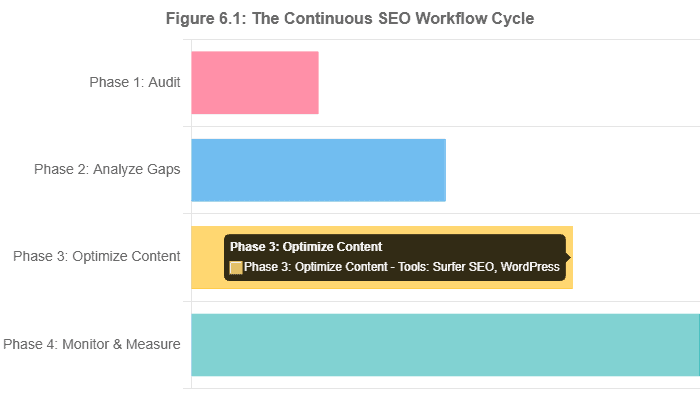
Phase 1: Foundational Audit & Competitor Analysis (Weeks 1-2)
This initial phase is about establishing a baseline. You cannot know where you are going until you know exactly where you are. The goal is to uncover all existing technical issues and to clearly define your competitive landscape.
- Tool: Screaming Frog SEO Spider
- Action: Conduct a full crawl of your entire WordPress site (with Database Storage Mode enabled). Your primary goal is to create a log of all critical technical issues. Export lists of 4xx errors, 3xx redirect chains, duplicate content, and pages with missing metadata. This is your technical debt backlog.
- Tool: Semrush or Ahrefs
- Action 1 (Site Audit): Run a parallel site audit within your chosen all-in-one suite. While Screaming Frog provides the raw data, these tools offer a high-level “Health Score” and excellent, user-friendly reports on Core Web Vitals and other critical issues. Cross-reference the findings with your Screaming Frog crawl to prioritize the most impactful fixes.
- Action 2 (Competitor Identification): Use the “Organic Competitors” report to identify your top 3-5 true organic search competitors. These are not necessarily your direct business competitors, but the websites that consistently appear for the keywords you want to rank for. This list will serve as the foundation for all subsequent analyses.
Outcome of Phase 1: A prioritized list of technical SEO fixes for your developer and a clearly defined set of competitors to analyze.
Phase 2: Keyword & Content Gap Analysis (Weeks 3-4)
With a clean technical foundation, the focus shifts to strategy. This phase involves identifying opportunities by analyzing what’s already working for your competitors and understanding the language of your target audience.
- Tool: Ahrefs or Semrush
- Action (Content Gap): Use the “Content Gap” (Ahrefs) or “Keyword Gap” (Semrush) tool. Enter your domain and the competitor domains you identified in Phase 1. The tool will generate a list of keywords that one or more of your competitors rank for, but you do not. This is your low-hanging fruit—a list of proven topics that are relevant to your audience. Filter this list for reasonable difficulty and high business relevance.
- Tool: AnswerThePublic
- Action (Intent Analysis): Take the primary topics and high-priority keywords from your gap analysis and run them through AnswerThePublic. This will enrich your keyword list with user intent, providing the specific questions, comparisons, and prepositions your audience is using. This transforms a keyword like “WordPress hosting” into actionable content ideas like “how to choose WordPress hosting” and “WordPress hosting vs shared hosting.”
Outcome of Phase 2: A data-driven content calendar for your WordPress blog, filled with topics that have proven demand and are tailored to answer specific user questions.
Phase 3: Content Creation & Optimization (Ongoing)
This is the execution phase where strategy becomes tangible content. This is an ongoing, cyclical process.
- Tool: Surfer SEO (or alternative)
- Action (New Content): For each new topic on your content calendar, create a Content Editor brief in Surfer. Provide this brief to your writers or use it yourself to draft an article that is optimized from the ground up to meet the data-driven targets for Content Score, term usage, and structure.
- Action (Existing Content): Use Surfer’s “Content Audit” feature to identify underperforming pages from your WordPress site (e.g., a post that ranks on page 2). Run these pages through the Content Editor to find optimization gaps and refresh them to improve their performance.
Tool: Best WordPress SEO Plugin
- Action (Publishing): Use the Surfer SEO plugin to publish your optimized content directly to your WordPress site. Before hitting “Publish,” do a final check of all on-page elements: ensure your SEO plugin (e.g., Yoast, Rank Math) has the correct meta title and description, images have descriptive alt text, and internal links to other relevant posts are included.
Outcome of Phase 3: A steady stream of new and refreshed content being published on your WordPress site, with each piece having the highest possible probability of ranking.
Phase 4: Monitoring & Measuring (Ongoing)
SEO is not “set it and forget it.” Continuous monitoring is essential to understand what’s working, double down on successes, and calculate the all-important ROI.
- Tool: Semrush or Ahrefs
- Action (Rank Tracking): Input your primary target keywords into the Rank Tracker. Monitor your ranking progress weekly. Pay close attention to how your rankings change after publishing new, optimized content or following a Google algorithm update.
- Action (Backlink Monitoring): Set up alerts to be notified when you or your competitors gain or lose significant backlinks. This helps you spot new link-building tactics and protect your own link profile.
- Tool: Google Analytics
- Action (Performance & ROI): On a monthly and quarterly basis, review your organic traffic, conversions, and user engagement metrics. Use the framework from Part 5 to calculate your SEO ROI, connecting your investments in tools and content to tangible business growth. Use these insights to refine your content strategy for the next cycle.
Outcome of Phase 4: A clear understanding of your SEO performance, a quantifiable ROI to report to stakeholders, and data-driven insights to fuel the next iteration of your strategic workflow.
Frequently Asked Questions
What are the most important factors to consider when choosing an SEO tool?
The two most critical factors are **data accuracy** and **ease of use**. First, the data must be reliable. As an analysis by 321 Web Marketing demonstrated, traffic estimates can vary wildly between platforms. It’s wise to choose a tool whose data most closely aligns with your own authoritative sources, like Google Analytics. Second, the tool must be usable for your team. A platform with a thousand features is useless if its interface is too overwhelming. For beginners, a clean UI and clear guidance are paramount, while experts may prioritize feature depth over simplicity.
How do you know if an SEO tool’s data is accurate?
You can never be 100% certain, as all third-party tools rely on estimates derived from crawling and clickstream data. However, the most effective method for validation is to conduct a comparative analysis. As detailed in the same 321 Web Marketing report, you can take a specific data point from Google Analytics 4 (e.g., organic users over a set date range) and compare it to the estimates provided by Ahrefs, Semrush, and Moz for the same period. The tool that consistently provides the closest estimate to your actual data is likely the most accurate for your website.
Figure 7.1: A chart visualizing the data accuracy test, comparing organic traffic estimates from major SEO tools against actual Google Analytics 4 data. Data sourced from 321webmarketing.com.
Is SEO still worthwhile in 2025, given the rise of AI?
Yes, SEO is more critical than ever, but the strategy has evolved. The rise of AI Overviews means the old tactics of simple keyword targeting are obsolete. According to WPBeginner, this shift is causing a surge in “zero-click searches” and squeezing organic traffic. SEO in 2025 is worth it because it’s the discipline focused on adapting to these changes. It’s about creating high-quality, authoritative content that directly answers complex user queries, optimizing for user experience (E-E-A-T), and ensuring technical perfection. The very tools discussed in this guide are what enable businesses to compete and win visibility in this new AI-driven search environment.
How long does it take to see results from SEO?
Patience is paramount in SEO. According to Semrush, you can typically expect to start seeing tangible results within **four to six months**. This timeline can be influenced by many factors, including the age and authority of your WordPress site, the competitiveness of your keywords, the quality of your strategy, and, most importantly, the consistency of your execution. SEO provides compounding returns; it’s a long-term investment, not a short-term tactic.
What is the best SEO tool for a beginner vs. an expert?
This depends entirely on the user’s needs and experience.
For beginners, a tool like **Moz Pro** is often recommended. Reviewers praise it for being the most user-friendly of the major suites, with clear charts and actionable recommendations that are accessible to someone new to SEO.
For an expert: Experts typically gravitate towards the comprehensive data and feature depth of **Ahrefs** and **Semrush**. For highly specialized tasks, the go-to tool is **Screaming Frog**, which offers unparalleled control and data for deep technical audits, a task that would overwhelm a novice.
Can I use these tools for Local SEO on my WordPress site?
Yes, particularly the all-in-one suites. **Semrush** stands out here, as it offers a dedicated Local SEO toolkit as an add-on. This helps with managing your Google Business Profile, tracking rankings in specific geographic locations (down to the city or postal code level), and managing local directory citations. While Ahrefs and Screaming Frog aren’t built specifically for local SEO, you can still use them to analyze the site structure and backlink profiles of local competitors to inform your strategy.
How does AI in tools like Semrush and Surfer SEO actually help?
AI acts as a powerful assistant that automates and enhances traditional SEO tasks. In **Semrush**, AI powers features like ContentShake AI and the topic cluster generator, which automate the strategic planning of content. It also has specialized checks for AI Search readiness. In **Surfer SEO**, AI powers the Content Editor. It uses NLP to analyze top-ranking pages and provide real-time recommendations. Its AI writer can generate a fully optimized first draft, dramatically speeding up the content creation process. In essence, AI takes on the heavy lifting of data analysis and initial drafting, freeing up human experts to focus on strategy, creativity, and adding unique insights.

Best WordPress SEO Blueprint
Navigating the complexities of search engine optimization in 2025 requires more than just a passing familiarity with WordPress plugins. As we’ve explored, achieving true dominance in Google’s search results is an engineering discipline that demands a sophisticated toolkit, a data-driven mindset, and an unwavering commitment to quality. The path to the top is paved with meticulous technical audits, insightful competitive analysis, and content that not only answers questions but also satisfies the deeper intent of the user.
The key takeaway from this extensive analysis is that winning at WordPress SEO is a synergistic process. It is the combination of:
- A **technically flawless website**, diagnosed and maintained with the forensic precision of a tool like Screaming Frog
- A **deep understanding of the competitive landscape**, mapped out by the powerful intelligence of an all-in-one suite like AhrefsSemrush
- **High-quality, authoritative content** that is perfectly aligned with user intent, discovered through a search listening tool like AnswerThePublic and engineered to rank with a content optimization platform like Surfer SEO.
- A **data-driven strategy** that continuously measures performance and proves its value through a rigorous application of **ROI analysis** via Google Analytics.
The tools themselves, as powerful as they are, are not a magic bullet. They are the instruments—the scalpels, the telescopes, the blueprints. You, the website owner, the marketer, the SEO professional, are the conductor. Your strategy, your expertise, and your consistent execution are what will ultimately drive results. These platforms provide the data to make smarter decisions, move faster, and focus on what truly drives real results in a search landscape increasingly defined by AI and user experience.
The journey to SEO mastery is a marathon, not a sprint. It requires investment, patience, and a willingness to learn and adapt. Your blueprint for success is now clear. The next step is to take action. Start with a single tool—run a free Screaming Frog crawl, sign up for a Semrush trial, and analyze a keyword in Ahrefs. Begin the process of transforming your WordPress site from a passive presence into an active, dominant force in the search results. The tools are ready. The strategy is here. Your journey starts now.
The Foundation: SEO Plugin for WordPress and Smart XML Sitemaps
This ultimate guide to Mastering WordPress SEO in 2025 is designed for WordPress users who wish to move beyond basic functions and dominate the search engine results. While established WordPress SEO plugins like Yoast SEO and Rank Math SEO provide essential foundational tools—such as managing meta tags, creating smart XML sitemaps, implementing schema markup, and generating meta descriptions—the guide emphasizes utilizing standalone tools for advanced SEO strategies. These external SEO tools are necessary for complex tasks, such as in-depth keyword research using platforms complementary to Google Keyword Planner, conducting comprehensive technical SEO audits, and conducting competitive analysis. By combining a reliable WordPress SEO plugin to handle core on-page seo directly within the WordPress admin dashboard with these specialized SEO analysis tools, users can elevate their entire search engine optimization workflow to secure higher SEO rankings.
Strategy and Measurement: Google Analytics and the SEO Analysis Tool
The core focus is maximizing the performance of a WordPress site by leveraging the data collected from key platforms. Monitoring is crucial, and the guide details how to integrate tools like Google Search Console and Google Analytics to effectively track keyword rankings and analyze search traffic. While an all-in-one plugin like Rank Math or the Yoast SEO plugin can provide features such as internal linking suggestions and a basic keyword rank tracker, true domination requires adopting a comprehensive SEO suite approach. This means incorporating specialized premium SEO plugins or SaaS tools for specialized functions, such as a dedicated redirection plugin or solutions for e-commerce seo and WooCommerce SEO. This comprehensive strategy enables the website owner to ensure their WordPress website is fully optimized, moving beyond the capabilities of a simple free plugin to become a highly tuned, SEO-friendly content machine.
Achieving Dominance: WooCommerce SEO, Schema Markup, and Higher SEO Rankings
Ultimately, Mastering WordPress SEO in 2025 is about making strategic choices among the best available options. Whether starting with the free version of a major plugin or investing in Yoast SEO Premium or Rank Math, the goal is to fully control all SEO settings and maximize opportunities, such as securing rich snippets through the expert use of schema markup. The guide advises against relying solely on a single WordPress SEO plugin, instead recommending a tailored stack of plugins and external SEO tools. This blended approach—combining the power of a robust WordPress SEO plugin, such as The SEO Framework or Rank Math, for core functions with standalone platforms for content optimization and competitor intelligence—is the definitive path to winning the SEO game and achieving superior SEO rankings in today’s complex search environment.
Conclusion: The Combined Approach to Advanced SEO Mastery
To truly master advanced SEO in 2025 and dominate search results, the key lies in augmenting your core WordPress plugin functionality. While a tool like Yoast SEO or another best SEO plugin provides the essential on-page SEO controls—from managing XML sitemaps and meta descriptions to perfecting the focus keyword—it must be supported by specialized external platforms. Achieving a top keyword rank and securing success in areas like local SEO and e-commerce seo requires integrating with Google Analytics for performance data and using platforms complementary to Google Keyword Planner for research. Utilizing a dedicated keyword rank tracker is essential to track keyword rankings, providing the data necessary for continuous improvement. Ultimately, the best WordPress SEO plugin setup is a combination: a powerful WordPress SEO plugin that handles all base SEO settings (including internal links), paired with a modular set of tools to execute the advanced content SEO overview that drives long-term success.
A high‑performing WordPress SEO program in 2025 pairs one SEO plugin with advanced SEO tools to control on‑page execution and drive strategic gains. Your WordPress site needs a comprehensive WordPress SEO plugin to manage SEO settings, XML sitemaps, Google News sitemaps, SEO titles, meta descriptions, internal linking suggestions, SEO templates, and Google Search Console integration inside the WordPress dashboard. In contrast, off-page, content, and technical SEO work occurs on external platforms that provide more in-depth SEO analysis and measurement across search engines and search results.
Select a primary WordPress SEO plugin and avoid installing multiple plugins; conflicts reduce search engine visibility and site speed. Start with an existing WordPress SEO plugin that fits your stack—a popular WordPress SEO plugin such as Yoast SEO or another option from the top WordPress SEO plugins shortlist—and review WordPress SEO plugins against requirements before adding premium SEO plugins. Most popular SEO plugins offer a free version or a free plugin tier; upgrade only if the added features significantly reduce time spent on complex SEO tasks.
Criteria for the best WordPress SEO plugin: accurate XML sitemaps and Google News sitemaps; precise control of SEO title and meta descriptions; schema for rich snippets; ability to import SEO data and export plugin data via CSV file; strong Google Search Console and Google Analytics plugin integrations; dependable internal linking suggestions; and clear templates for editors. If you prefer training, Yoast SEO Academy helps standardize execution for writers and SEO professionals.
Complement the plugin with SEO tools that cover research, crawling, and reporting. Use free keyword research tools and a free SEO tool for quick checks, and recommend Google Keyword Planner to validate keyword research, generate keyword ideas, and spark blog post ideas that can win Google search results. Connect Google Analytics so SEO data from Google Search Console and analytics aligns with decisions on content and links, supporting steady gains in search engine rankings, search rankings, and SEO rankings across the WordPress website.
Handle technical SEO with advanced SEO tools: crawl for broken links, duplicate content, and redirect chains, then hand over an actionable CSV file to engineers. Apply the same workflow to e-commerce SEO and local SEO, where structured data, indexation, and product or location signals matter more than a WordPress plugin alone can cover.
Improve performance with a WordPress caching plugin; many WordPress users choose WP Rocket as the best WordPress caching plugin, though other WordPress plugins can help stabilize site speed across your own websites. Keep the stack lean: pick one SEO plugin, plus a caching layer, and add other SEO plugins or other top SEO plugins only if they close a specific gap.
Advance your topical coverage with an SEO topical entity graph, video SEO, and structured data for rich snippets, enabling search engines to accurately interpret your website’s SEO and reward breadth and depth. Maintain governance by reviewing SEO plugins quarterly, validating fields, and auditing content updates against your SEO strategy.
Operational playbook: pick the best SEO plugins for your use case, lock SEO settings, connect Google Search Console and Google Analytics, run weekly crawls to surface broken links and performance issues, use Google Keyword Planner plus free keyword research tools to generate keyword ideas, publish through the WordPress dashboard, and measure impact on search engine optimization across every WordPress site you manage.
Outcome: cleaner execution, faster pages via a tuned WordPress caching plugin, stronger analytics via Google Search Console integration, and compounding gains in search engine rankings driven by a tight alignment between your primary WordPress plugin and the advanced SEO tools that handle the heavy lifting. Request a pragmatic audit to map your stack, migrate safely, and deploy a repeatable process that raises revenue.

With over 27 years of hands-on SEO expertise, starting from my early days as a CFO. Quitting that job to build a top-ranked web hosting business in 1995, I’ve mastered WordPress optimization as a precise engineering discipline. Through extensive research, high-level consulting, and developing a WordPress site that achieved over a thousand organic Google rankings—culminating in a six-figure sale—I’ve decoded Google’s algorithm over 27 years to develop wordpress engineering that transforms underperforming WordPress sites into authoritative powerhouses. Business owners frustrated by stagnant traffic, low visibility, and missed opportunities find relief as I help them deliver measurable ROI through higher rankings, increased leads, and sustainable growth. As owner of dominant city-based SEO platforms in major U.S. markets, I outperform industry gurus, empowering entrepreneurs, local businesses, agencies, and marketers via my WordPress Optimization services at wordpressoptimization.com to unlock their site’s full potential.