WordPress On-Page SEO 2025
TL;DR: WordPress On-Page SEO optimizes individual web pages to boost search rankings and user engagement by refining content, titles, meta descriptions, and technical elements using WordPress tools or plugins. In 2025, it aligns with Google’s E-E-A-T and Core Web Vitals, offering benefits like higher rankings, increased click-through rates, targeted traffic, and improved conversions. Key practices include keyword optimization, schema markup, and mobile-friendly design, ensuring a strong ROI for businesses.
On-page work is one layer of the wordpress seo services we run for clients.
Table of Contents
Introduction
The Bedrock: WordPress Technical SEO Fundamentals
Crafting a Semantically Sound HTML Structure
Mastering Meta Tags for Maximum Click-Through Rate (CTR)
Winning Rich Snippets with Schema Markup
The Engine: Advanced Content Optimization Strategies
The Keyword Placement & Topical Authority Blueprint
Optimizing for “People Also Ask” (PAA) and AI Overviews
The Chassis: WordPress-Specific On-Page Tuning
Perfecting Permalinks for Clarity and SEO
High-Impact Image Optimization Workflow
Achieving Blazing-Fast Page Speed (Core Web Vitals)
Your Action Plan: The WordPress On-Page SEO Audit & Final Checklist
The Ultimate WordPress On-Page SEO Checklist (TL;DR)
WordPress On-Page SEO FAQ
Final Thoughts
Appendices
Appendix A: The Complete WordPress Technical SEO Audit Checklist
Appendix B: Complete Article & FAQ Schema Markup (JSON-LD)
What Is WordPress On-Page SEO?
WordPress On-Page SEO involves optimizing individual web pages on a WordPress site to improve their search engine rankings and attract relevant traffic by refining content, structure, and technical elements, such as title tags, meta descriptions, headings, and optimizing images, directly within the platform’s editor or with the use of SEO plugins. This targeted approach ensures that each page aligns with user intent and Google’s ranking factors, such as E-E-A-T and Core Web Vitals, to maximize visibility in the 2025 AI-driven search landscape. The benefits of WordPress on-page seo include:
- Enhancing search rankings through optimized titles and title tags, meta tags, and keyword placement.
- Increasing click-through rates with compelling meta descriptions and schema markup for rich snippets.
- Improving user experience with clear heading structures and fast-loading, mobile-friendly search results pages.
- Driving targeted traffic by aligning page content with specific user search intents.
- Boosting conversions by optimizing calls-to-action and internal linking.
- Strengthening site authority with consistent, high-quality content that builds trust with search engines and users.
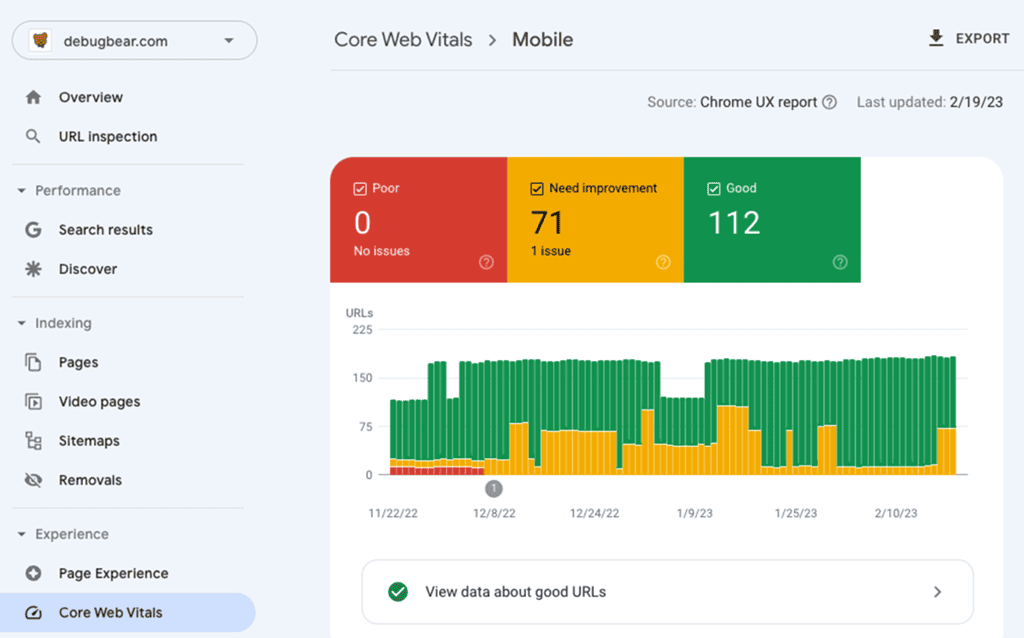
A Google PageSpeed Insights report showing Core Web Vitals metrics for mobile devices, a key part of a WordPress technical Search Engine Optimization audit.t Semantic HTML5 Elements: Modern, high-quality themes (e.g., Astra, GeneratePress, Kadence) use semantic tags like <article>, <section>, <nav>, and <main> correctly. These elements clearly convey their meaning to both the browser and the developer. This helps crawlers differentiate between main content, sidebars, and footers, avoiding “div soup,” which can confuse crawlers and negatively impact machine readability. A theme with clean code is a cornerstone of good on-page performance.
“It’s easy to consider website themes as just a splash of color on top of a finished structure. But there’s so much more involved.” – John Mueller, Google
How to Check: Advise users to right-click on their page, select “Inspect,” and look for these tags wrapping their main content areas. A well-structured theme will utilize the <main> element for the primary content block and the <article> element for individual blog posts or articles, which is a best practice for accessibility and machine readability.
Mastering Meta Tags for Maximum Click-Through Rate (CTR)
Objective: To craft compelling SERP snippets that entice users to click on your result over competitors. While Google’s John Mueller has stated that meta tags are used to form SERP snippets and not directly for rankings, a well-crafted snippet can encourage people to visit your page, which is the ultimate goal.
Implementation: The easiest way to manage meta tags is with a dedicated plugin. This approach simplifies the process and ensures you adhere to best practices without requiring direct code editing.
Recommended SEO Plugins
All-in-One SEO (AIOSEO), Rank Math, or Yoast SEO are the top contenders for this task. They provide intuitive interfaces within the WordPress editor to manage these crucial elements.
Key Meta Tags:
Title Tag
Importance: The single most important on-page element for influencing clicks. A well-crafted titles and title tags can significantly improve your organic CTR.
Best Practices: Keep it under 60 characters to avoid truncation in SERPs. Front-load the primary keyword, as its placement can significantly impact rankings. Use modifiers like “Guide,” “Checklist,” or the current year (2025) to attract clicks and target long-tail variations.
Meta Description
Importance: Although it doesn’t directly impact rankings, a compelling meta description has a significant influence on CTR. It’s your ad copy on the SERP.
Best Practices: Keep it under 160 characters. Include the primary keyword, as Google often bolds it in the search results, drawing the user’s eye. Treat it as ad copy: state the benefit of clicking and include a clear call-to-action (CTA).
Canonical Tag:
Importance: This tag is crucial for preventing duplicate content issues by informing Google which version of a page is the primary, or “master,” copy. This is especially important for sites with URL parameters or syndicated content.
Action: Top-tier WordPress SEO plugins, such as AIOSEO, Rank Math, and Yoast SEO, handle this automatically by adding a self-referencing canonical tag to each page. Users should verify that this is enabled in their plugin’s settings to avoid potential penalties.
Winning Rich Snippets with Schema Markup
Objective: To provide explicit context to search engines, making your site eligible for rich snippets (like star ratings, prices, FAQs) that dramatically increase SERP visibility and CTR. Schema markup is a form of microdata that, once added to a webpage, creates an enhanced description that appears in search results.
Implementation Strategy:
- Step 1: Choose Your Tool. For ease of use and accuracy, using a plugin with a built-in schema generator is highly recommended. Top choices include Rank Math and AIOSEO. For more advanced needs, a dedicated plugin like Schema Pro is an excellent option. These tools simplify the process of adding complex JSON-LD code to your site.
- Step 2: Select the Right Schema Type. The type of schema you implement should directly correspond to your content type.
- For Content/Blog Posts: Use Article schema. If your blog post includes a question-and-answer section, embedding the FAQPage schema can make you eligible for the interactive FAQ rich snippet in the SERPs.
- For Business Websites: Use Organization schema for general business information and LocalBusiness schema for brick-and-mortar locations. This should include your address, hours, and phone number to enhance your local search presence.
- For E-commerce Sites: Use Product schema. This is essential for displaying price, availability, and review ratings directly in the search results, which can significantly boost clicks.
- Step 3: Deploy and Validate. After configuring the schema within your chosen plugin, the final, crucial step is to validate the code. Use Google’s official Rich Results Test to ensure your implementation is error-free and eligible for rich snippets. This tool will show you exactly how Google interprets your structured data and indicate if any corrections are needed.
Search Engines: High Quality Content Optimization Strategies
With a solid technical base, your content becomes the engine driving your rankings. In 2025, this means moving beyond simple keyword research and insertion to a sophisticated strategy focused on topical authority, user intent, and structural clarity for both humans and AI. As noted by First Page Sage, “Consistent Publication of Satisfying Content” is the most heavily weighted ranking factor, and creating such content requires a deep understanding of these advanced principles.
The Keyword Placement & Topical Authority Blueprint
Core Concept: The focus has shifted from “keyword density” to “topical relevance.” The goal is to prove to Google that you are an authority on a subject by covering it comprehensively. This is achieved through a strategy known as building “topical authority,” where a website creates a cluster of interconnected content centered around a central theme.
Strategic Keyword Placement:
While keyword stuffing is a relic of the past, strategic placement remains vital. The following table illustrates where keywords provide the most impact, a fundamental aspect of on-page SEO for WordPress.
| Page Element | Keyword Requirement | Example & Execution Notes |
|---|---|---|
| URL Slug | Include the primary keyword, separated by hyphens. | yourdomain.com/wordpress-on-page-seo-guide. This helps Google understand what the page is about and can improve organic CT. |
| H1 Title | Must contain the primary keyword, preferably near the start. | <h1>The Complete Guide to WordPress On-Page SEO</h1>. This is a primary signal for the page topic. |
| First 100 Words | Naturally weave in the primary keyword. | “Mastering WordPress on-page SEO is critical for…” This confirms the page’s topic to both users and crawlers early on. |
| H2/H3 Subheadings | Use variations and long-tail keywords. | <h2>Your WordPress Technical SEO Checklist</h2>. This helps structure the content and target a broader range of related queries. |
| Image Alt Text | Use descriptive, keyword-relevant text. | alt="Checklist for WordPress on-page SEO". This is crucial for accessibility and image search visibility. |
Building Topical Authority with Content Clusters:
This advanced strategy involves creating a central “Pillar Page” on a broad topic, which is supported by multiple “Cluster Pages” that delve into specific subtopics in greater detail. This structure signals deep expertise to search engines.
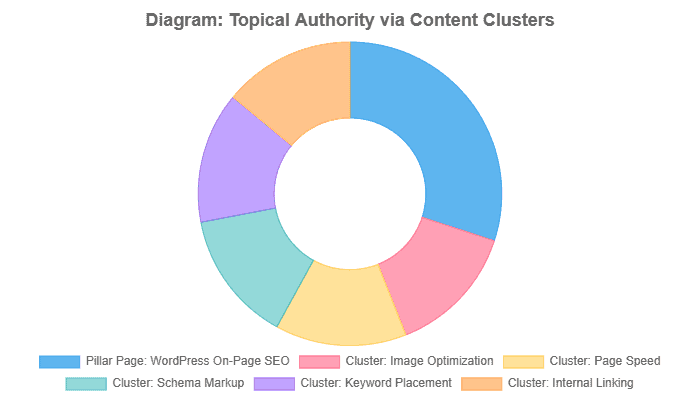
Internal Linking for Clusters: The linking strategy is what holds the cluster together. All cluster pages must link up to the pillar page, and the pillar page should link down to the clusters. This creates a powerful, interconnected web of content that signals expertise. It’s crucial to use descriptive, keyword-rich anchor text. For example, a link from a cluster page about image optimization should use anchor text like `…learn more in our ultimate guide to WordPress page SEO` to link back to the pillar page.
Optimizing for “People Also Ask” (PAA) and AI Overviews
Objective: To get your content featured directly in SERP answer boxes and cited by AI. With the rise of AI Overviews, which appeared in up to 47% of Google searches according to a Botify study, structuring content for direct answers is no longer optional.
Strategy:
- Mine PAA for Questions: Use the “People Also Ask” section on Google for your target keyword to find the exact questions your audience has. Tools like AnswerThePublic can also provide a goldmine of consumer insights by visualizing these questions.
- Answer Directly and Concisely: Structure parts of your content to answer these questions directly. Use the question as an H2 or H3 subheading, followed by a clear, immediate answer in the first paragraph. This format is easily digestible for both users and AI models.
- Use Structured Formatting: Employ bulleted lists, numbered lists, and tables. This scannable formatting is easily parsed and “lifted” by AI for use in Overviews. According to Search Engine Journal, the more predictable your structure, the easier it is for a language model to extract and summarize it.
The Chassis: WordPress-Specific On-Page Tuning
WordPress provides a robust chassis, but it requires specific tuning to perform at its peak. This section covers the platform-specific settings and tools that are critical for a complete WordPress page SEO strategy. While WordPress is SEO-friendly out of the box, these adjustments are necessary to optimize visibility.
Perfecting Permalinks for Clarity
The “Why”: A clean, descriptive URL is readable for users and provides strong keyword research to search engines. It helps both parties understand the page’s content before they even click.
The “How”:
- Recommended Structure: The universally recommended structure is Post Name (%postname%). It’s concise and allows for direct keyword inclusion.
- Implementation: Navigate to your WordPress SEO Dashboard > Settings > Permalinks. Select the “Post name” option and save your changes. This is a one-time setting that establishes a clean foundation for all future content.
High-Impact Optimize Images Workflow
Objective: To reduce page load time, which is a critical ranking factor, and provide search engines with context about your visual content. Unoptimized images are a primary cause of slow websites.
Step-by-Step Workflow:
- Descriptive File Names: Before uploading, rename image files to be descriptive and keyword-rich. Instead of IMG_1234.jpg, use something like wordpress-on-page-seo-checklist.jpg. This provides search engines with an initial indication of the image’s content.
- Add Alt Text: After uploading, always fill in the “Alternative Text” field in the WordPress SEO Media Library or block editor. This text is crucial for accessibility (for screen readers) and for SEO, as it describes the image to crawlers.
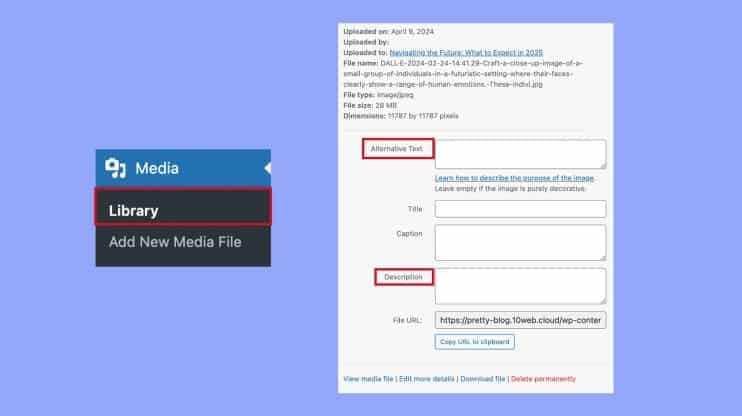
Always add descriptive alt text to your images within the WordPress media library to improve accessibility and on-page signals.
Always add descriptive alt text to your images within the WordPress SEO media library to improve accessibility and on-page signals.
- Compress Images: Utilize a plugin to automatically compress images upon upload, maintaining a noticeable loss in quality. This can drastically reduce file size and improve load times.
- Plugin Recommendations: EWWW Image Optimizer or Smush are excellent choices that automate this process.
- Serve Next-Gen Formats (WebP): Modern image formats, such as WebP, offer superior compression and quality compared to traditional JPEG and PNG formats. Many modern caching and image optimization plugins can automatically convert your images to the WebP format for browsers that support it, further enhancing performance.
Achieving Blazing-Fast Page Speed Optimization (Core Web Vitals)
Objective: To improve user experience and satisfy Google’s Core Web Vitals, which are confirmed ranking factors. A slow website directly impacts bounce rates and conversions.
Core Optimization Levers:
- Caching: This is the single most effective speed enhancement for a WordPress site. Caching creates static HTML versions of your pages, so they don’t have to be dynamically generated by PHP for every visitor. This dramatically reduces server load and Time to First Byte (TTFB).
- Plugin Recommendations: WP Rocket is a premium plugin widely regarded as the best all-in-one solution, thanks to its ease of use and powerful features. For users on LiteSpeed servers, the free LiteSpeed Cache plugin is an excellent, highly integrated option.
- Lightweight Theme: A bloated theme with excessive code and scripts is a primary cause of slow sites. Choosing a performance-focused theme is critical.
- Recommendations: Themes like Astra, GeneratePress, and Kadence are consistently ranked among the fastest due to their clean code and minimal bloat.
- Quality Hosting: A slow server will undermine all other optimizations. While a deep dive is beyond the scope of this guide, choosing a reputable managed WordPress host is a foundational requirement for good performance.
Measuring the Impact:
The benefits of page speed optimization are tangible and measurable. A typical site can see dramatic improvements across key metrics after implementing proper caching and optimization techniques.
| Performance Metric | Before Optimization | After Optimization | Improvement |
|---|---|---|---|
| LCP (Largest Contentful Paint) | 3.8s | 1.5s | -60% |
| Total Page Size | 2.1 MB | 750 KB | -64% |
| HTTP Requests | 85 | 30 | -65% |
Data based on typical results from implementing a premium caching plugin like WP Rocket. Source: WP Rocket Case Study.
Your Action Plan: The WordPress SEO Audit & Final Checklist
Knowledge without action is useless. This final section provides a structured process for auditing your site and a concise checklist to ensure you implement the most critical tasks. A regular SEO audit is crucial for maintaining and improving your rankings over time, as it helps identify issues that could be negatively impacting your performance.
The Ultimate WordPress On-Page SEO Checklist (TL;DR)
- Foundational Setup: Set WordPress permalinks to /%postname%/.
- Install & Configure SEO Plugin: Install Rank Math or AIOSEO to manage meta tags and schema.
- Implement Caching: Install and configure WP Rocket to dramatically improve page speed.
- Optimize All Images: Use a plugin like EWWW Image Optimizer to compress images and ensure all have descriptive alt text.
- Deploy Schema Markup: Use your SEO plugin to add Article and FAQPage schema to all relevant content.
- Conduct Your First Audit: Perform a comprehensive seo audit using the checklist in Appendix A and technical tools like Google Search Console and Screaming Frog.
WordPress SEO FAQs
How do I add keywords to a WordPress page for SEO?
Strategically place your primary keyword in the SEO title tags, meta description, H1 tag, URL, and the first 100 words of your content. Utilize secondary and related keywords in H2/H3 subheadings, as well as image alt text. Plugins like AIOSEO or Rank Math offer a “Focus Keyphrase” feature to guide you through this process, ensuring natural integration without keyword stuffing.
What is the best permalink structure for WordPress SEO?
The best and most recommended permalink structure is “Post name” yourdomain.com/%postname%/). It is clean, user-friendly, and allows you to include your target keyword directly in the URL, which is a positive on-page SEO signal. You can set this in your WordPress dashboard under Settings > Permalinks.
How do I check my WordPress SEO score?
Most modern SEO plugins, such as AIOSEO (with its TruSEO score) and Rank Math, provide a real-time on-page analysis score directly within the WordPress editor. For a more comprehensive view, use technical optimization tools like Semrush’s On-Page SEO Checker or Ahrefs’ Site Audit to run a full SEO audit of your page against top competitors and receive actionable recommendations.
What is on-page seo, and why is it essential for my WordPress site?
On-page SEO refers to all the optimization efforts you make directly on the individual pages and posts of your WordPress website. This includes optimizing content, image alt text, headings, and your title and meta description. It’s crucial because it helps search engines understand the topic and value of your content, which directly influences your ranking in search results.
What are some essential wordpress seo tips for optimizing a post or page?
Key wordpress seo tips include choosing a primary keyword and using it naturally in your content and headings, optimizing images for speed and search engines, ensuring your content is high-quality and comprehensive, and correctly setting your title and meta description. Also, focus on improving user experience (UX) and incorporating both internal and external links.
What is the difference between general page seo and the specific steps for a WordPress post or page?
Page SEO is a general term for optimizing a single webpage. The steps for a WordPress post or page are essentially the same, but the platform provides specific tools (like dedicated SEO plugins) and settings that make implementing on-page seo easier, such as designated fields for the slug, meta description, and features to manage links.
How do I create an effective title and meta description to appear in search results?
Your title and meta description should be compelling, accurately summarize the post or page content, and contain your primary keyword. Keep the title within character limits (around 50-60 characters) and the description around 150-160 characters so they display correctly in search results. A good meta description acts like an advertisement to encourage clicks.
Why is the meta description important for on-page seo if it isn’t a direct ranking factor?
While the meta description isn’t a direct ranking factor for on-page seo, it is vital for click-through rate (CTR). A well-written, engaging description helps your link stand out in search results, which can indirectly signal to Google that your content is valuable, thereby allowing search engines to understand its relevance.
How do internal links contribute to wordpress seo tips?
Internal links connect different posts or page content within your own website. They are a core component of on-page seo because they help search engines discover new content, pass “link equity” between pages, and improve site navigation, keeping users on your site longer.
What is the purpose of using external links in my WordPress content?
External links point from your WordPress site to a reputable, relevant outside source. They serve two primary purposes for on-page seo: they help establish your content as a resource by backing up claims with credible sources, and they signal trust and authority to both users and search results crawlers.
What is the link icon in WordPress, and how do I use it to add internal links and external links?
The link icon (often looks like a chain 🔗) in the WordPress editor is used to create hyperlinks. To use it, you select the anchor text you want to link, click the link icon, and then paste the URL for either an internal link (to another page on your site) or an external link (to an outside website). You can also set external links to open in a new tab for a better user experience.
Understanding Search Intent for WordPress and SEO Tips
Mastering WordPress on-page SEO in 2025 means combining precision, structure, and consistency across every element of your WordPress site. The foundation of effective optimization begins with understanding how search engines crawl, interpret, and rank your web pages. A strong on-page SEO strategy aligns both the technical and content layers of your WordPress website so that search engines understand precisely what your content offers and why it deserves visibility in Google Search results.
Within your WordPress dashboard, tools such as the Yoast SEO plugin, AIOSEO, or Rank Math simplify this process by helping you craft optimized title tags, meta descriptions, schema markup, and XML sitemaps. These SEO plugins also streamline the management of internal and external links, as well as the identification of broken links, ensuring your site architecture supports both users and search engine crawlers. Maintaining SEO-friendly URL structures and an organized HTML code layout helps search engines index your pages efficiently, while also avoiding duplicate content issues.
Effective page optimization also depends on speed and usability. Page speed optimization, mobile usability, and site speed directly influence engagement metrics tracked in Google Analytics and reported in Google Search Console. Combine these insights with regular technical optimization audits to fix broken links, enhance structured data, and continually refine your on-site SEO performance.
Your content must serve user search intent through high-quality content, strategic keyword research, balanced keyword density, and relevant alt tags for all media. A clear internal linking structure, supported by both contextual internal and external links, boosts authority and helps distribute ranking power across multiple pages. Likewise, optimizing your title tags and meta descriptions for clarity and relevance increases clicks from search engine results pages and Google Search itself.
Off-Page SEO
While off-page SEO refers to signals such as backlinks and brand authority, your on-page SEO and technical optimization efforts create the foundation that enables these external factors to work effectively. Together, they form a comprehensive SEO strategy that elevates your search rankings and generates more traffic from organic search engine results.
In short, success in WordPress SEO stems from disciplined execution, which involves optimizing images, maintaining SEO-friendly URLs, publishing blog posts that provide value, and utilizing proven SEO tools to measure progress. By integrating the right on-page SEO plugin, continually refining your page content, and following consistent WordPress SEO tips, your website will perform better in search results pages, attract qualified visitors, and strengthen your position across Google Search Console and beyond.
Google Analytics: Google Domination
Dominating Google in 2025 requires a disciplined and holistic approach to WordPress page SEO. It’s an ongoing process of technical refinement, strategic content creation, and continuous measurement. It’s not about chasing hacks, but about moving faster, making more intelligent decisions, and focusing on what drives real search results. By following the framework in this guide, you are not just “doing SEO”; you are building a resilient, authoritative digital asset poised for long-term search visibility. The ability to decipher data and translate that information into an actionable strategy is what differentiates good campaigns from great, lead-generating campaigns.
Use this checklist to perform a regular seo audit on your WordPress site. This process helps identify technical issues that could be hindering your performance.
Key Takeaways: WordPress On-Page SEO 2025
- Core Objective — WordPress On-Page SEO focuses on optimizing individual web pages within a WordPress site to improve search rankings, user engagement, and conversion rates through better content, structure, and technical precision.
- Modern Alignment — In 2025, optimization strategies must follow Google’s E-E-A-T (Experience, Expertise, Authoritativeness, Trustworthiness) and Core Web Vitals to meet the standards of AI-driven search and Google Search results.
- Technical Foundation First — A successful SEO strategy begins with technical SEO: clean HTML code, semantic markup, optimized WordPress themes, SEO-friendly URL structures, and Core Web Vitals compliance.
- Structured Content Hierarchy — Proper use of the H1–H6 heading hierarchy and semantic elements (<main>, <article>, <section>) helps search engines understand content, improving crawlability and visibility in AI-driven overviews.
- Compelling Meta Tags — Optimized title tags (under 60 characters) and meta descriptions (under 160 characters) crafted through SEO plugins like Yoast SEO, Rank Math, or AIOSEO improve CTR and search performance.
- Schema Markup for Rich Results — Implementing structured data via JSON-LD schema (Article, LocalBusiness, FAQPage, Product) increases eligibility for rich snippets, enhancing presence on search engine results pages.
- Keyword Placement & Topical Authority — Modern SEO focuses on topical depth over keyword density. Strategic keyword placement in the URL, H1, first 100 words, H2/H3, and alt tags signals relevance while building topical authority through interlinked content clusters.
- Internal & External Links — Strong internal linking structures distribute authority across multiple pages, while authoritative external links strengthen context and trust.
- AI & PAA Optimization — Structuring content to answer People Also Ask (PAA) questions and using concise, scannable formats makes content more likely to appear in AI Overviews and direct answer boxes.
- WordPress-Specific Settings — Essential tuning includes clean permalinks (/blog post name/), optimized images (compressed, alt-tagged, WebP format), and fast-loading pages using caching plugins like WP Rocket or LiteSpeed Cache.
- Continuous Performance Measurement — Use Google Analytics, Google Search Console, and on-page SEO tools to track search engine rankings, fix broken links, whether internal and external links, analyze site speed, and monitor Core Web Vitals.
- Audit & Iteration — A recurring on-page SEO audit ensures your optimization efforts remain aligned with current algorithm shifts and AI-search trends, preventing duplicate content issues and maintaining structured data integrity.
- Holistic SEO Integration — While off-page SEO builds authority through backlinks, on-page SEO provides the foundation that allows external signals to work effectively, together driving higher visibility and more traffic.
- End Goal — Mastering WordPress Page SEO in 2025 entails creating a technically flawless, content-rich, and AI-optimized WordPress website that ranks well on Google Search, enhances the user experience, and drives measurable business growth.
Ready to Improve Your WordPress Search Rankings?
If your WordPress website isn’t performing at the level you expect in Google Search results, it’s time to take control of your on-page Search Engine Optimization and strategy. With the right WordPress site SEO plugin—like Yoast SEO or Rank Math—you can optimize every web page, strengthen internal and external links, and make search engines understand your page content with structured HTML code, schema markup, and high-quality content.
Start by auditing your WordPress site dashboard using Google Search Console and Google Analytics to track search engine rankings, fix broken internal and external links, and analyze page speed optimization. Utilize on-page SEO tools to identify duplicate content, optimize your meta description and title tags, and maintain SEO-friendly URL structures (tools like Google Search Console and Google Analytics). The right on-page WordPress SEO plugin will help you optimize images, adjust keyword density, and improve mobile usability for every visitor.
A comprehensive WordPress site SEO and On-page SEO strategy encompasses both technical Search Engine Optimization fundamentals and off-page SEO signals. While off-page SEO refers to backlinks and brand authority, your on-site SEO—including on-page seo, schema markup, and internal links—lays the foundation for success. By refining your WordPress SEO plugin setup, creating a detailed XML sitemap, and maintaining SEO-friendly URLs, your WordPress site will appear higher in search engine results pages and attract more traffic from search engines that accurately index and rank your pages.
Take action now: implement proven WordPress site SEO tips, use the WordPress editor to fine-tune your page optimization, and measure progress with Google Analytics. When your on-page SEO and technical SEO align, your site achieves faster site speed, better visibility, and more substantial ROI. Optimize today—because every improvement you make compounds your growth in Google Search and beyond.

With over 27 years of hands-on SEO expertise, starting from my early days as a CFO. Quitting that job to build a top-ranked web hosting business in 1995, I’ve mastered WordPress optimization as a precise engineering discipline. Through extensive research, high-level consulting, and developing a WordPress site that achieved over a thousand organic Google rankings—culminating in a six-figure sale—I’ve decoded Google’s algorithm over 27 years to develop wordpress engineering that transforms underperforming WordPress sites into authoritative powerhouses. Business owners frustrated by stagnant traffic, low visibility, and missed opportunities find relief as I help them deliver measurable ROI through higher rankings, increased leads, and sustainable growth. As owner of dominant city-based SEO platforms in major U.S. markets, I outperform industry gurus, empowering entrepreneurs, local businesses, agencies, and marketers via my WordPress Optimization services at wordpressoptimization.com to unlock their site’s full potential.