How to Track AI Search Traffic in GA4 (Check AI Traffic for Free)
Are you interested in tracking and growing the traffic your website gets from LLM tools like ChatGPT, Grok, Claude, and Gemini? Step one is to check how much AI search traffic your website gets today. This guide shows you how to check AI traffic for free, common metrics used for AI visibility, and tips for increasing your brand’s AI search traffic.
Tracking AI Search Traffic in GA4
AI search traffic refers to the website visits or referrals originating from LLM tools like ChatGPT, Perplexity, Gemini, Claude, Grok, Deepseek, and similar platforms, where users click on links, citations, or sources provided in AI-generated responses rather than traditional keyword-based search results.
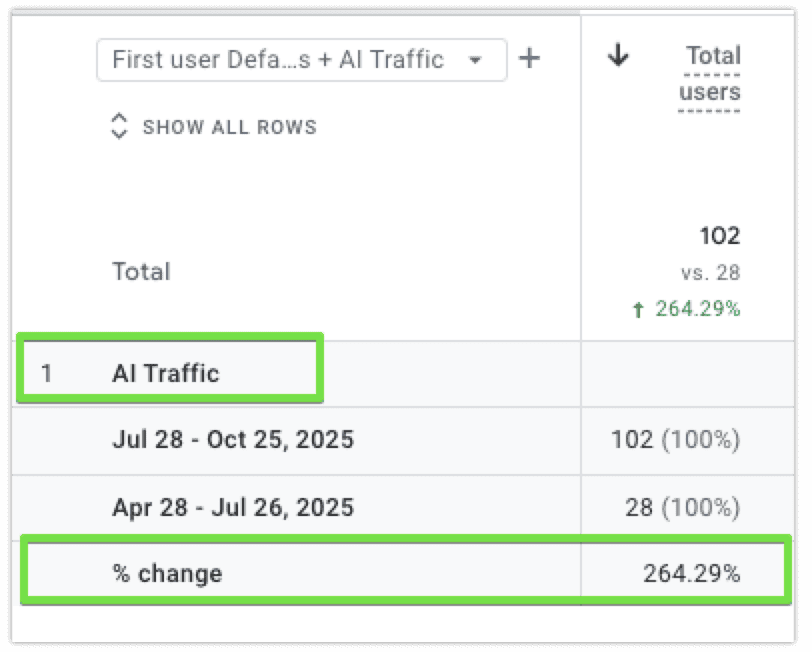
AI search traffic is often higher-quality and more conversion-oriented than conventional organic search, with studies showing 23x better conversion rates in some cases (source), though it currently represents less than 1% of total traffic for most sites and is growing rapidly (up 527% in recent reports).
You can check AI search traffic from ChatGPT, Grok, Claude, and every other LLM, for free in Google Analytics (GA4) after you’ve set up a custom channel.
Alternatively, you can use a paid tool to track both traffic and rankings in the top LLM platforms. This combination of metrics is known as AI visibility.
How to Check AI Traffic in GA4
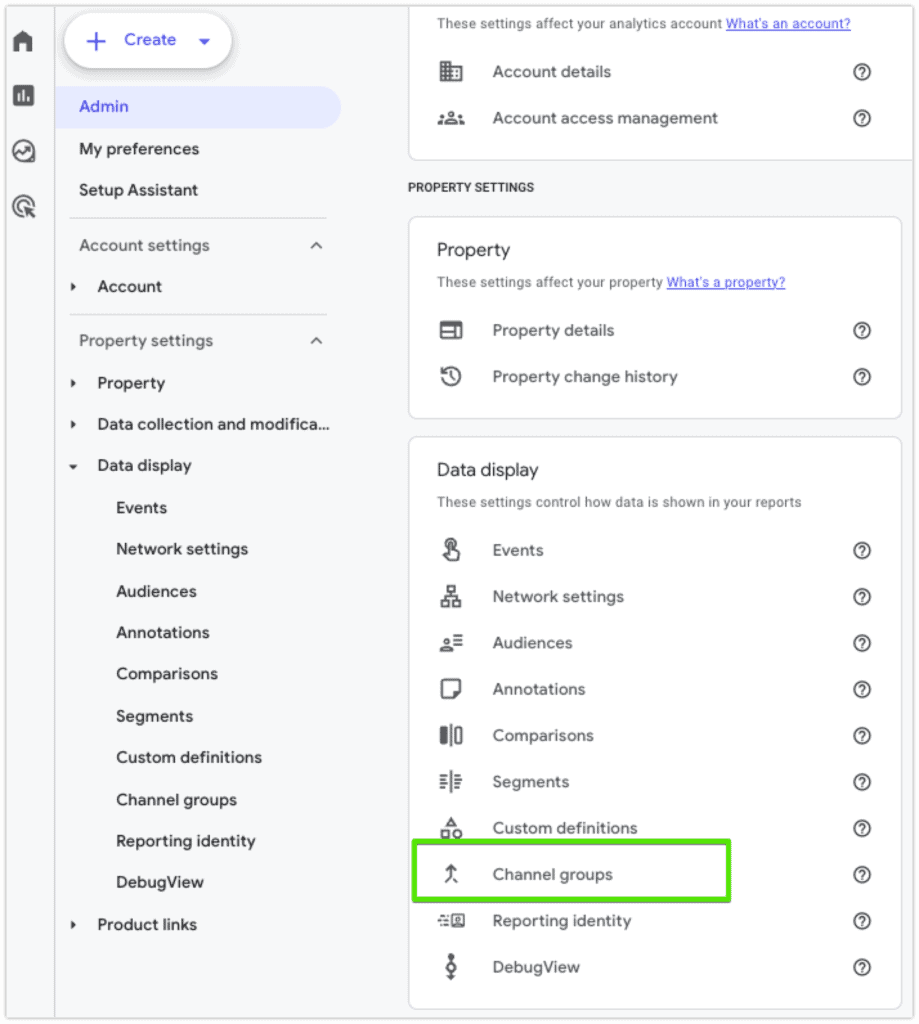
Tracking referral traffic from AI tools like ChatGPT is actually quick and simple. You just need to set up a custom channel group so you can easily compare AI traffic to traditional channels like Organic Search is actually quick and easy. Here are the steps:
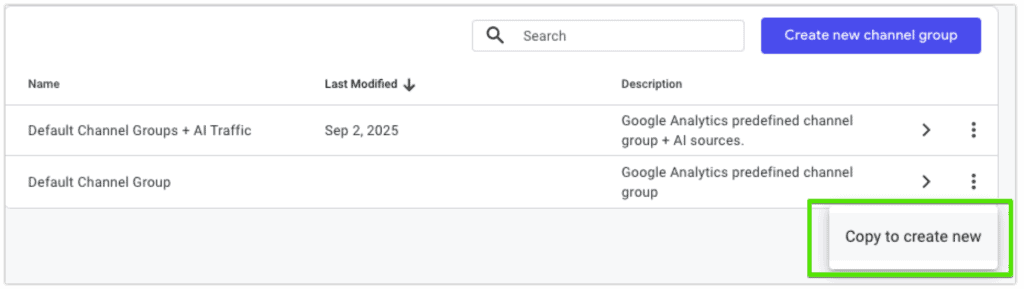
- In your GA4, go to Admin -> Custom Channel Groups
- Clone your Default Channel Group
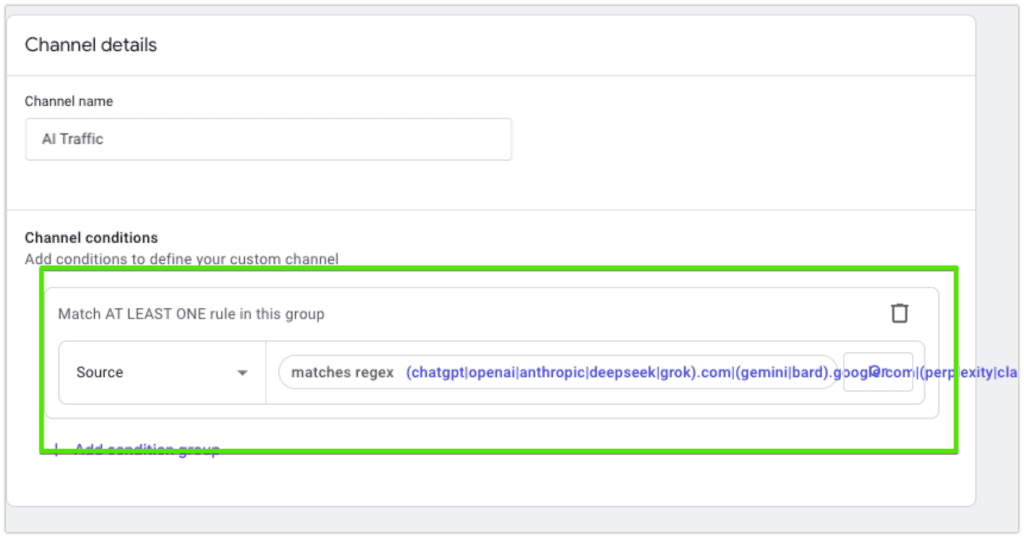
- Add a new channel source, label it AI Traffic
- Set the condition to contains regex and paste the following text: (chatgpt|openai|anthropic|deepseek|grok).com|(gemini|bard).google.com|(perplexity|claude).ai|(copilot.microsoft|edgeservices.bing).com|edge\scopilot
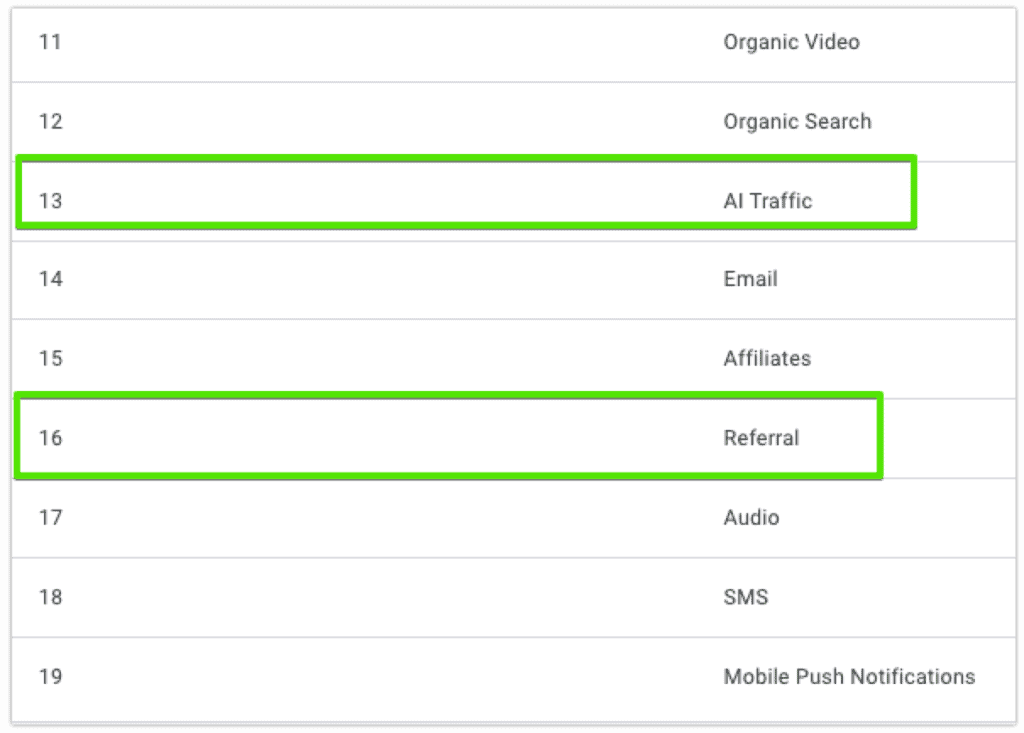
- Save, click Reorder, move AI traffic next to Organic Search
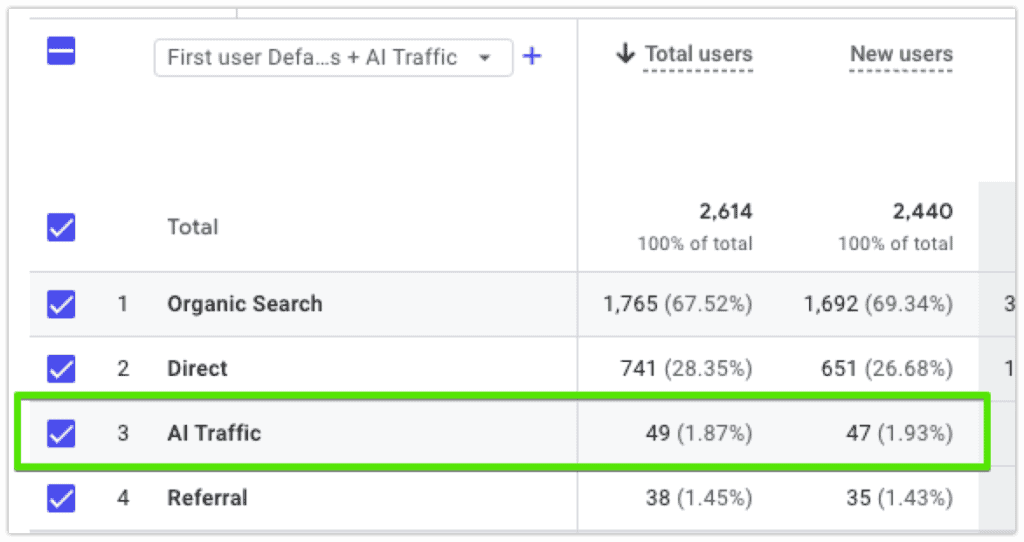
You can now see referral traffic from every LLM source categorized under AI Traffic.
How to Track Your Rank in ChatGPT, Grok, Claude, Deepseek, and Every Other LLM (AI Visibility)
While traditional SEO reporting involved tracking your rank for targeted keywords in search engines like Google, AI visibility involves tracking how often and how favorably your website is mentioned by LLMs like ChatGPT and Grok for targeted prompts.
Unlike traditional SEO, LLMs do not provide a free tool to track visibility data in their platforms. For SEO, you can use Google Search Console to track search engine rankings for free, or you can use a paid tool like Semrush or Ahrefs for premium analytics and dashboards. For LLM rank tracking, you need a third party tool like Cairrot or Scrunch AI. We discuss the best AI visibility tools in more detail later in this guide.
8 Tips to Optimize Your Website for AI Traffic
Now that you can track AI traffic, you probably want to win more of it! Here are some of the best strategies for making your website rank better in LLM tools:
- Set up Bing Webmaster Tools for your website. Whenever we set up Bing Webmaster Tools on a website, we notice LLMs like ChatGPT and Microsoft Copilot begin crawling the website more often.
- Make dedicated pages for your different Products/Services, Solutions, and Service Areas. Every dedicated product or service you offer probably deserves it’s own page. Make sure these pages are linked from your top navigation and footer menus.
- Target mostly transactional and commercial keywords first. Also known as bottom-funnel keywords, these are the terms like lead directly to leads and sales.
- Publish at least three blogs when targeting a new set of keywords. Google is more likely to rank you if you have multiple related topics that link to each other. The more Google ranks you, the more LLMs will pick you up too.
- Internal link from all blogs. Every article should have at least one Product/Service, Solutions, or Service Area page, and at least one other related blog.
- Get mentioned with a descriptor in as many places as possible. Descriptors could be “best,” “affordable,” “reliable,” “fast,” etc. The more often different areas of the internet mention you as a great choice for some specific reason, the more likely LLMs are to repeat that back to their users. This is also called “backlinking.”
- Use press releases. For the same reason as you should get mentioned in as many places as possible. What to you want LLMs to know and say about you? Put it in a PR on some cadence and you will increase the odds of LLMs using the messaging you prefer.
- Use header tags properly on every page. Use one H1 per page. Start each new section with an H2. Use H3 headers as your subsection for an H2 topics, H4 headers as subsections for H3 topics, etc.
There are also several tools and WordPress plugins that will assist with your AI visibility. Check our guide featuring The Top 33 AI SEO Tools for WordPress ->
Best AI Visibility Tools for LLM Rank Tracking
These are five of the best tools for LLM visibility available today based on our real-life experience:
- Cairrot: Starting at $39/mo, Cairrot is an AI visibility tool for tracking and optimizing position in LLM tools like ChatGPT, Perplexity, Grok, Claude, and more, providing analytics to win traffic from AI search. It is designed for WordPress and includes a free plugin for tracking crawls from different LLMs.
- Gumshoe AI: Starting at approximately $20-$30 per report, Gumshoe AI offers persona-specific visibility analysis, competitive ranking comparisons, source citation tracking, and brand equity protection for marketing and SEO teams.
- Profound: Starting at $99/mo, Profound is built for enterprises that need visibility across many AI engines with structured content workflows.
- Scrunch AI: Starting at $299/mo, Scrunch AI is an enterprise AEO tool designed for large marketing agencies.
- AthenaHQ: Starting at $249/mo (with a heavy discount for your first month), AthenaHQ delivers GEO insights with a focus on sentiment and blind-spot detection.
For a more detailed review of these AI visibility tools, check out our guide to The Best AI Visibility Tools for WordPress
Agencies that Specialize in AI SEO / AI Visibility
- WordPress Dynamics: AI SEO agency specialized for WordPress users and local businesses that need both traditional SEO and AEO/GEO services.
- EWR Digital: Houston-based AI SEO agency specializing in Energy companies, crypto companies, law firms, and healthcare services.
- iPullRank: Developed “Relevance Engineering” for machine-readable content, leading to substantial gains in ChatGPT mentions and AI Overview appearances.
- Directive Consulting: Integrates GEO with demand generation, achieving 75% organic traffic growth and strong AI visibility for enterprise clients.
- Webris: Known as a top law firm SEO agency for years, Webris they also pionereed the Blueprint Training, one of the most popular Local SEO and GEO training groups online. Webris team includes Ryan Stewart, an SEO expert known for his detailed guides on YouTube.
- Amsive: Gained popularity for its series of helpful Service pages explicitly cover “SEO + LLM Optimization” and “Answer Engine Optimization,” with multi-office national presence, as well as their connection with Lily Ray, a popular SEO influencer in New York.
Learn More About Tracking & Growing AI Traffic on Your Website
Ready to start winning AI search traffic on your website? WordPress Dynamics is the premier AI SEO agency for WordPress websites. Contact us today to see how to get your website more traffic from traditional and AI search tools like ChatGPT, Gemini, Claude, Gemini, Grok, and more.

With over 27 years of hands-on SEO expertise, starting from my early days as a CFO. Quitting that job to build a top-ranked web hosting business in 1995, I’ve mastered WordPress optimization as a precise engineering discipline. Through extensive research, high-level consulting, and developing a WordPress site that achieved over a thousand organic Google rankings—culminating in a six-figure sale—I’ve decoded Google’s algorithm over 27 years to develop wordpress engineering that transforms underperforming WordPress sites into authoritative powerhouses. Business owners frustrated by stagnant traffic, low visibility, and missed opportunities find relief as I help them deliver measurable ROI through higher rankings, increased leads, and sustainable growth. As owner of dominant city-based SEO platforms in major U.S. markets, I outperform industry gurus, empowering entrepreneurs, local businesses, agencies, and marketers via my WordPress Optimization services at wordpressoptimization.com to unlock their site’s full potential.