WordPress Keyword Research 2025
TL;DR: Today, effective WordPress keyword research strategies shift from previously used outdated keyword optimization to prioritizing user intent—categorized as informational, navigational, transactional, or commercial investigation—while aligning with Google’s E-E-A-T principles to drive qualified traffic, conversions, and up to 40% of business revenue. The process involves brainstorming seed keywords from customer perspectives and online communities; leveraging free tools like Google Suggest, People Also Ask, AnswerThePublic, and Google Keyword Planner (or paid options like Semrush and Ahrefs) to uncover opportunities; analyzing metrics such as search volume, difficulty, and intent for prioritization; implementing optimizations via WordPress SEO plugins like Yoast or Rank Math for on-page elements; building topical authority through interlinked pillar and cluster content; and measuring success with tools like Google Analytics and Search Console. Conducting this without relying heavily on plugins offers cost-effective, beginner-friendly benefits, providing a strong foundation for intent-driven content that enhances rankings, resilience to algorithm changes, and long-term ROI.
Keyword research is the first thing we do inside our wordpress seo services.
Table of Contents
- Introduction: Why WordPress Keyword Research is Your Most Critical SEO Task in 2025
- The “Why”: Foundational Importance of Keyword Research in the AI Era
- The Core Workflow: A Step-by-Step Guide to WordPress Keyword Research
- Technical Implementation: Weaving Keywords into Your WordPress Site
- Advanced Strategy: Building Topical Authority with Keyword Clusters
- The WordPress SEO Toolkit: Integrating Plugins & Third-Party Tools
- Measuring Success: How to Track Your Keyword Research ROI
- FAQ: Answering Your Top WordPress Keyword Research Questions
- Conclusion: Your Path to WordPress SEO Dominance
- Appendix: Title, Meta Description, and Schema for This Article
What Is WordPress Keyword Research?
A wordpress keyword research is the foundational process of identifying, analyzing, and prioritizing the specific words, phrases, and user intents behind search queries to optimize content on WordPress websites, evolving in 2025 to emphasize semantic understanding, AI-driven insights like Google’s AI Overviews, and alignment with E-E-A-T principles rather than outdated keyword stuffing, all achievable through free tools such as Google Suggest, People Also Ask, and AnswerThePublic without relying on plugins. This method provides substantial benefits for site owners seeking sustainable SEO success, including:
- Decoding user intent across informational, navigational, transactional, and commercial categories to create highly relevant content that boosts engagement and reduces bounce rates.
- Enhancing visibility in AI-powered search features, such as AI Overviews, by producing comprehensive, quotable content.
- Building E-E-A-T to establish topical authority and trustworthiness, differentiating from low-quality competitors.
- Driving qualified organic traffic with commercial potential, contributing to up to 40% of business revenue through higher conversions.
- Offering a cost-effective, beginner-friendly approach using free tools for quick wins and long-term ROI without plugin dependencies.
- Enabling strategic prioritization through metrics such as search volume data and difficulty, to focus on high-impact opportunities and competitor gaps.

Why WordPress Keyword Ideas and Research are Critical
The phrase “SEO is dead” echoes through the digital marketing landscape with predictable regularity. In 2025, this sentiment feels more potent than ever. We’re navigating a world reshaped by Google’s AI Overviews (AIOs), a steady rise in zero-click searches, and a fundamental shift from keyword stuffing to user-centric optimization. It’s easy to look at this turbulent environment and conclude that the old playbooks are obsolete. But that conclusion misses the point entirely.
The truth is, what died was a simplistic, outdated version of SEO. Billions of people still turn to search engines for answers, solutions, and products; their methods have just evolved. As a result, the core discipline of understanding what users want and why they want it has become the most critical factor for success. This is the essence of modern keyword research.
For the millions of website owners using WordPress, this new era presents a unique opportunity. The platform’s inherent flexibility, combined with a sophisticated, strategic approach to keyword research, is the definitive formula for dominating search results. This guide is not another list of fleeting tips. It is a comprehensive, world-class playbook for 2025, designed to equip you with the foundational principles, technical know-how, and advanced strategies to turn your WordPress site into an authoritative voice in your niche.
We will journey from the foundational “why”—exploring the critical importance of keyword research in an AI-driven world—to the practical “how.” You will receive step-by-step instructions for implementing your findings directly within the WordPress dashboard. Finally, we will ascend to advanced strategies, teaching you how to construct formidable topic clusters that build unshakable topical authority. Packed with actionable steps, updated tool comparisons, and expert insights, this guide will serve as your roadmap to not just surviving, but thriving in the new era of search.
The Foundational Importance of WordPress Keyword Research
Before diving into the technicalities of tools and plugins, it’s crucial to establish *why* keyword research remains the bedrock of any successful SEO strategy in 2025. The landscape has shifted, but the principles have only become more profound. Understanding user intent is no longer a best practice; it is the entire game.
Beyond Keywords to Intent
The most significant evolution in search is the move from a lexical to a semantic understanding of queries. Google’s systems, as revealed during the Google antitrust trial, prioritize user engagement signals—such as `goodClicks` and `lastLongestClicks`—over simple keyword matching. This means Google is less concerned with whether your page contains an exact phrase and more concerned with whether it *satisfies the user’s underlying need*.
Keyword research is our primary tool for decoding this need. Search intent is broadly categorized into four types:
- Informational: The user wants to know something (e.g., “what is keyword research?”).
- Navigational: The user wants to go to a specific website (e.g., “WordPress login”).
- Transactional: The user wants to buy something (e.g., “purchase WordPress maintenance service”).
- Commercial Investigation: The user is comparing options before a purchase (e.g., “Ahrefs vs Semrush”).
By identifying the intent behind the keywords your audience uses, you can create content that directly addresses their goals, leading to higher engagement, lower bounce rates, and stronger positive signals to Google.
Fuel for AI-Driven Search
The rise of AI Overviews and other answer engines has fundamentally changed the Search Engine Results Page (SERP). These features compile information from multiple high-ranking sources to provide a direct, synthesized answer. To be featured in these prominent positions, your content must be “quotable” and “experiential.”
A large-scale study found that only 5.4% of Google AI Overviews contained an exact match of the search query. This statistic is a powerful testament to the fact that AI is looking for context, depth, and well-structured information, not just keywords. Thorough keyword research uncovers the granular questions, related concepts, and subtopics that allow you to build the comprehensive content AI models use as source material. By targeting long-tail keywords and question-based queries, you are essentially creating the building blocks for these AI-generated summaries.
The Foundation of E-E-A-T
Google’s emphasis on Experience, Expertise, Authoritativeness, and Trustworthiness (E-E-A-T) is a direct response to the flood of low-quality, generic content. To rank, you must prove you are a credible source. Keyword research is the strategic starting point for demonstrating E-E-A-T.
By identifying the specific, nuanced keywords your audience uses, you can create content that showcases deep expertise rather than surface-level knowledge. For example, instead of a generic article on “SEO,” a well-researched strategy might lead you to create a detailed guide on “troubleshooting hreflang conflicts for international SEO,” a topic that inherently demonstrates a higher level of expertise. As noted by Exploding Topics, E-E-A-T and brand signals are how Google distinguishes trusted sources from the noise, and this importance is only set to increase.

Business Impact: From Clicks to Conversions
Ultimately, SEO is a business function. Keyword research provides the critical link between search visibility and tangible business outcomes. By targeting keywords with commercial or transactional intent, you attract users who are further down the buying funnel and more likely to convert.
Data consistently shows the power of this connection. Organic search is credited with generating 40% of business revenue, and 49% of marketers claim it delivers the highest return on investment (ROI) compared to other channels. This ROI is not accidental; it is the direct result of a strategy that begins with understanding and targeting the keywords that qualified customers use to find solutions. Without this foundational research, SEO efforts are untargeted, inefficient, and unlikely to produce meaningful business growth.
A Step-by-Step Guide to WordPress Keyword Research
A successful keyword strategy is built on a repeatable, systematic process. This workflow takes you from abstract ideas to a prioritized list of terms ready for implementation on your WordPress site. It’s a cycle of discovery, analysis, and refinement.
Step 1: Brainstorming & Seed Keyword Identification
Before you touch any tool, the most valuable research happens in your mind and through understanding your audience. This initial phase involves generating “seed keywords”—broad, foundational topics that will later be expanded upon.
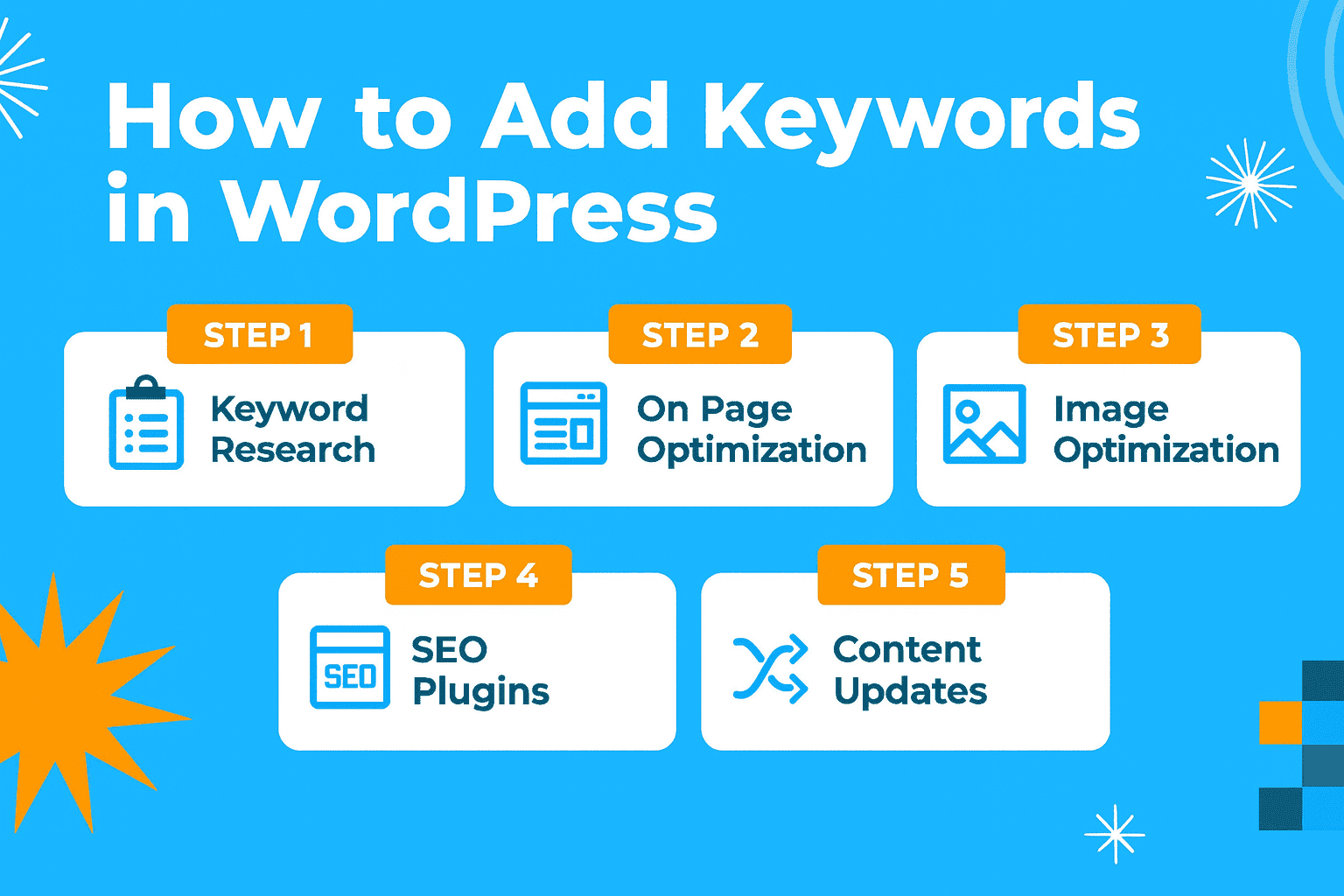
Start with Your Core Business: List your primary products, services, and the main categories of your expertise. If you’re a digital marketing agency, your services might be “SEO services,” “content marketing,” “PPC management,” and “WordPress development.”
Think Like Your Customer: Put Yourself in Their Shoes. What problems are they trying to solve? What questions do they have that your business can answer? A user doesn’t search for “our proprietary lead generation solution”; they search for “how to get more leads for my small business.”
Explore Online Communities: Dive into platforms where your target audience gathers. Subreddits, Quora threads, and industry forums are goldmines for discovering the exact language, pain points, and questions your potential customers have. Searching for phrases like “how to,” “problem with,” or “recommendation for” can reveal authentic, intent-driven keyword ideas.
Step 2: Finding Keyword Opportunities
With your seed keywords in hand, it’s time to use specialized tools to expand your list, uncover related terms, and gather data. These methods range from free and accessible to powerful and paid.
Free Methods
For those starting out or on a tight budget, these free resources provide immense value.
Google Suggest & “People Also Ask” (PAA): This is the lowest-hanging fruit. Simply type your seed keyword into Google and observe the autocomplete suggestions that appear. These are real, popular queries. The “People Also Ask” boxes that appear in the SERPs are a direct line into the follow-up questions users have, making them ideal for FAQ sections or dedicated blog posts.
AnswerThePublic: This tool takes Google’s suggestions and visualizes them into a comprehensive map of questions, prepositions, and comparisons. It’s an incredibly effective way to brainstorm content ideas and find long-tail keyword suggestions. The visual “wheel” helps you grasp the entire landscape of a topic at a glance.
Free Keyword Research Tools: Several platforms offer powerful free versions. The WPBeginner Keyword Generator is excellent for quickly generating hundreds of ideas from a single seed term. Google Keyword Planner, while designed for PPC, is invaluable for getting rough search volume estimates.
Freemium & Paid Tools
To gain a competitive edge, investing in an all-in-one SEO suite is essential. These tools offer more comprehensive data, in-depth competitor insights, and advanced filtering capabilities.
Semrush: Its “Keyword Magic Tool” is renowned for its massive database (over 25 billion keywords) and powerful filtering options. You can drill down by intent, question type, keyword difficulty, and more, making it easy to find targeted opportunities.

Semrush’s Keyword Magic Tool provides extensive data and filtering options for in-depth research.
Semrush’s Keyword Magic Tool provides extensive data and filtering options for in-depth research.
- Ahrefs: The “Keywords Explorer” tool is another industry leader, providing robust data on search volume, clicks, and global volume. Its “also rank for” and “position history” features are beneficial for understanding the full context of a SERP and how content performs over time.
- LowFruits: This tool offers a unique value proposition, specifically designed to identify low-competition keywords by pinpointing “weak spots” in the SERPs (e.g., pages with low domain authority or forums ranking in the top 10). This makes it an exceptional choice for new WordPress sites seeking quick wins.
Step 3: Analyzing & Prioritizing Keywords
A long list of keywords is useless without prioritization. This step involves analyzing key metrics to decide which keywords offer the best return on your content creation efforts.
Key Metrics Explained
Understanding these four metrics is fundamental to making smart decisions:
| Metric | What It Is | Why It Matters |
|---|---|---|
| Search Volume | The estimated number of times a keyword is searched for per month. | Indicates the potential traffic ceiling for a keyword. Higher is often better, but it comes with more competition. |
| Keyword Difficulty (KD) | A score (usually 0-100) that estimates how hard it is to rank on the first page of Google. | Helps you find achievable targets. New sites should focus on lower KD scores. |
| Search Intent | The underlying goal of the user’s search (Informational, Transactional, etc.). | Ensures you create the right *type* of content to satisfy the user, which is critical for ranking. |
| Cost Per Click (CPC) | The average price advertisers pay for a click on this keyword in Google Ads. | A high CPC often indicates high commercial value, meaning the traffic is likely to convert into leads or sales. |
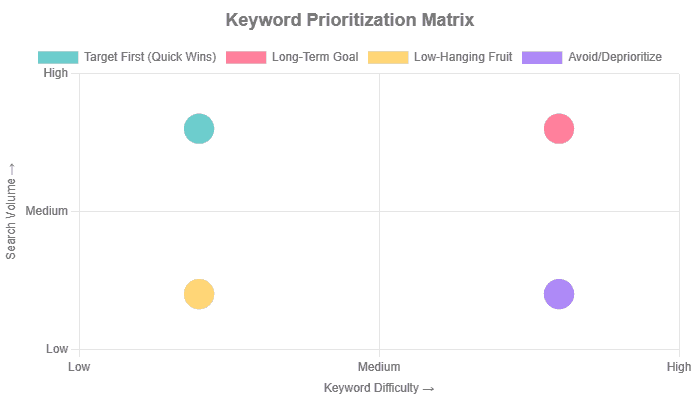
The Prioritization Matrix: A simple way to visualize your opportunities is with a 2×2 matrix. This helps you categorize keywords and decide where to focus your energy first.
Competitor Gap Analysis
One of the most powerful strategies is to find out what your competitors are ranking for that you aren’t. This is known as a “keyword gap” or “content gap” analysis. Tools like Ahrefs and Semrush have dedicated features for this. By entering your domain and a few competitor domains, you can generate a list of valuable keywords that drive traffic to them, providing a proven roadmap for your content strategy.
Technical Implementation For Your WordPress Site
Strategy without execution is just a dream. This section provides a practical, hands-on guide to translating your keyword research into tangible optimizations within the WordPress dashboard. The key is to leverage the power of SEO plugins to seamlessly integrate keywords into the most critical on-page elements.
Prerequisite: Choosing Your WordPress SEO Plugin
An SEO plugin is essential for any WordPress site. It simplifies complex technical tasks and provides a user-friendly interface for on-page optimization. The three dominant players in 2025 are Yoast SEO, Rank Math, and All in One SEO (AIOSEO). While all are excellent, they have slightly different strengths.
| Plugin | Best For | Key Keyword Feature | Pricing (Premium) |
|---|---|---|---|
| Yoast SEO | Beginners and content creators who value real-time analysis and clear guidance. | Traffic-light system for content and readability analysis; AI-powered title/description generator. | Starts at $99/year |
| Rank Math | Users want a feature-rich free version and affordable scalability. | Content AI provides keyword suggestions based on competitor analysis directly in the editor. | Starts at $59/year (first year) |
| All in One SEO (AIOSEO) | Users focused on automation, technical SEO, and scalability across multiple sites. | TruSEO on-page analysis, AI title/description generator, and a powerful Link Assistant for internal linking. | Starts at $49.60/year |
For the following examples, we will show screenshots that are representative of the interfaces found in these popular plugins. The core functionality is similar across all three.
1. Title Tags
The title tag is arguably the most important on-page SEO element. It’s the clickable headline that appears in search results and tells both users and search engines what your page is about.
How-to: In your WordPress post or page editor, scroll down to the SEO plugin’s meta box. You will find a field labeled “SEO Title” or “Title Tag.” Here, you can override the default post title.
Best Practice: Place your primary keyword as close to the beginning of the title as possible. Keep the total length under 60 characters to avoid it being truncated in search results. Make it compelling to encourage clicks.
2. Meta Descriptions
While not a direct ranking factor, the meta description is your sales pitch in the SERPs. A well-written description dramatically improves your Click-Through Rate (CTR).
How-to: Directly below the SEO Title field in your plugin’s meta box, you’ll find a “Meta Description” field.
Best Practice: Write a concise and compelling summary of the page’s content (approximately 155-160 characters). Include your primary keyword naturally and add a call-to-action (e.g., “Learn more,” “Discover how,” “Shop now”). Most plugins provide a colored bar that turns green when you’ve reached the optimal length.
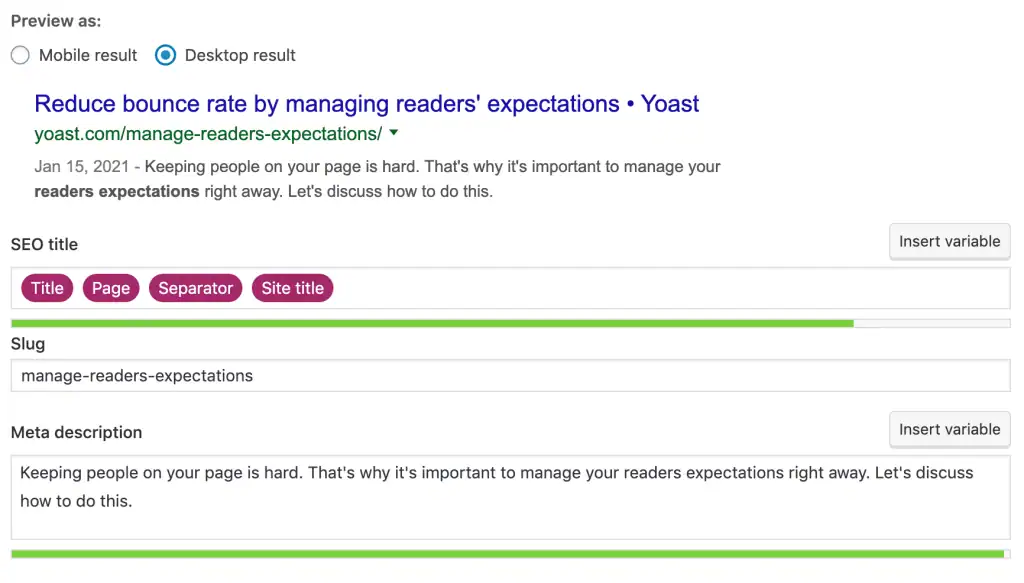
Editing the meta description in the Yoast SEO plugin, with a progress bar indicating optimal length
Editing the meta description in the Yoast SEO plugin, with a progress bar indicating optimal length
3. URL / Permalink Structure
A clean, descriptive URL is user-friendly and provides another relevance signal to search engines.
How-to: First, ensure your global permalink settings are SEO-friendly. Navigate to `Settings > Permalinks` in your WordPress dashboard and select the “Post name” option. For individual posts, you can edit the URL “slug” in the editor’s right-hand sidebar under the “URL” section.
Best Practice: Your URL slug should be short, descriptive, and contain your primary keyword. For example, for a post targeting “WordPress keyword research,” the ideal slug is simply `wordpress-keyword-research`.
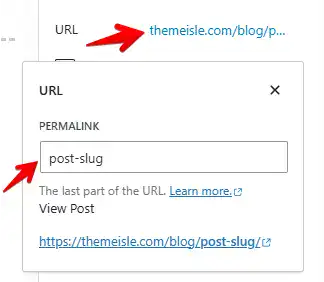
Customizing the URL slug for a post directly within the WordPress editor for better SEO
Customizing the URL slug for a post directly within the WordPress editor for better SEO
4. Headings (H1, H2, H3)
Headings structure your content for readers and search engines, creating a logical hierarchy.
How-to: By default, WordPress uses your post’s title as the main H1 tag. Within the block editor, you can add subsequent headings (H2, H3, etc.) by using the “Heading” block.
Best Practice: There should only be one H1 per page. Use your primary keyword in the H1. Use H2s for the main subtopics of your article, and incorporate secondary or related keywords into them. H3s can be used to break down H2 sections further. This creates a clear outline of your content.
5. Content Body (Introduction & First Paragraph)
Where you place your keyword in the main content matters.
How-to: Simply write your content in the WordPress editor.
Best Practice: Mention your primary keyword within the first 100-150 words of your article. This immediately confirms the page’s topic for both users and crawlers. Use your primary keyword and its variations naturally throughout the text. Please do not force them in; modern SEO is about topic relevance, not keyword density. SEO plugins analyze your content in real-time and provide feedback on keyword distribution and optimization.
6. Image SEO (Alt Text & File Names)
Image optimization is a frequently overlooked but powerful SEO tactic. It helps you rank in image search and makes your site more accessible.
How-to: Before uploading, rename your image file to be descriptive (e.g., `wordpress-keyword-research-tools.jpg`). After uploading, select the image in the block editor and fill in the “Alternative Text” (or “Alt Text”) field in the right-hand sidebar.
Best Practice: The alt text should accurately describe the image for visually impaired users. If it’s natural to do so, include your target keyword in the text. For example, for a photo of the Semrush dashboard, a good alt text would be: “Screenshot of Semrush Keyword Magic Tool showing results for WordPress keywords.” This is both descriptive and keyword-relevant.
Building Topical Authority with Keyword Clusters
To truly dominate the SERPs in 2025, it’s not enough to rank for individual keywords. You must establish “topical authority”—becoming the definitive, go-to resource on a subject in the eyes of Google. This advanced strategy establishes a robust content moat that is resilient to algorithm updates, underscoring a profound commitment to E-E-A-T.

Topical authority refers to the perceived expertise and credibility a website possesses on a specific subject. It’s built by consistently creating comprehensive, high-quality, and interconnected content that covers a topic in its entirety. Instead of just one article on “car detailing,” a site with topical authority would have dozens of articles covering everything from “best wax for black cars” to “how to remove swirl marks” and “ceramic coating vs. wax.”
In 2025, this is more important than ever. A study of Google’s ranking factors identified “Niche Expertise” as a core component, weighted almost as heavily as backlinks. By building topical authority, you’re not just optimizing for keywords; you’re optimizing for Google’s trust and confidence.
The Topic Cluster Model: Pillar & Cluster Content
The most effective method for building topical authority is the “topic cluster” model. This content strategy organizes your site architecture in a way that is logical for both users and search engine crawlers.
- Pillar Page: This is a long-form, comprehensive piece of content that provides a broad overview of a significant topic. It targets a broad, high-volume “head” keyword. For example, a pillar page could be “The Ultimate Guide to WordPress SEO.”
- Cluster Content: These are multiple, more specific articles that each dive deep into a subtopic related to the pillar. They target more specific, long-tail keywords. Examples of cluster content for the “WordPress SEO” pillar would be “WordPress Keyword Research,” “Technical SEO for WordPress,” and “Image SEO in WordPress.”
The magic happens in the internal linking. The pillar page links out to all of its cluster pages, and every cluster page links back to the central pillar page. This creates a tightly knit, semantically related group of content that signals to Google that you have covered a topic from every angle.
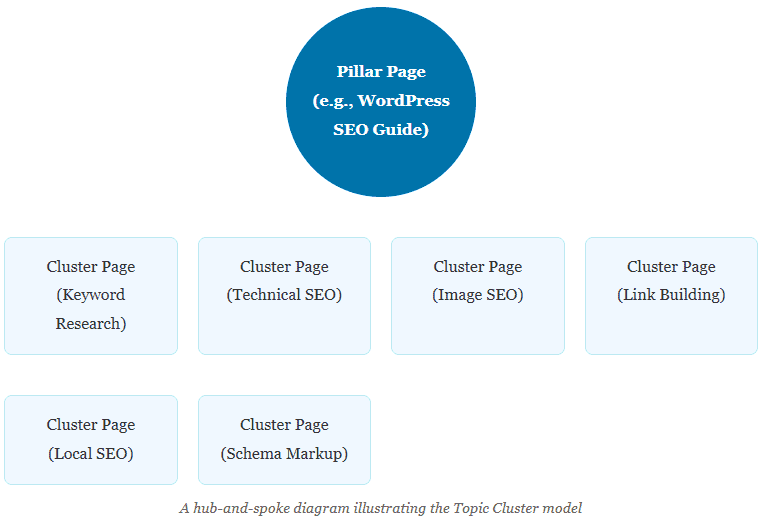
The 5-Step Workflow for Building Topic Clusters with Keywords
Building a topic cluster is a strategic process that integrates keyword research directly into your content planning and strategy.
Step 1: Identify Your Pillar Topic
Use keyword research to find a broad, high-volume topic central to your business that can be broken down into many subtopics.
↓
Step 2: Mine Keywords for Cluster Ideas
Use SEO tools like Semrush, Ahrefs, or AnswerThePublic to find all related long-tail keywords, questions, and subtopics associated with your pillar.
↓
Step 3: Map Keywords to Content
Group the related searches and relevant keywords into logical subtopics. Each group represents a future cluster article. For example, keywords like “how to find keywords,” “best research keyword tools,” and “long-tail keywords” all belong in a “Keyword Research Tools” cluster article.
↓
Step 4: Create the Content
Write the comprehensive pillar page first. Then, write the detailed, in-depth cluster articles, each focusing on its specific group of keywords.
↓
Step 5: Strategically Interlink
This is the most critical step. The pillar page must link to every cluster page. Every cluster page must link back to the pillar page—a link that connects related cluster pages and adds value for the reader.
WordPress Implementation Note: As your site grows, managing this internal linking structure can become complex. WordPress plugins can help. For instance, AIOSEO’s Link Assistant and Rank Math’s internal linking suggestions can automatically find linking opportunities within your content, making it easier to build and maintain your topic clusters.
While WordPress and a good SEO plugin form the foundation, a truly world-class keyword ideas and research strategy relies on a suite of specialized third-party SEO tools. Understanding how these tools work and integrate with your WordPress workflow is key to unlocking maximum efficiency and insight.
All-in-One SEO Suites: Ahrefs vs. Semrush for WordPress Users
Ahrefs and Semrush are the two undisputed titans of the SEO search engine software world. Both offer comprehensive toolkits for keyword research, competitor analysis, rank tracking, and site audits. However, for a WordPress user, they present slightly different strengths and integration points.
It is often lauded for the accuracy of its backlink data and its clean, user-friendly interface. Its core strength lies in the deep analysis of backlinks and competitor organic performance. The Ahrefs WordPress plugin focuses specifically on content audits. It integrates with your Google Analytics and Google Search Console data to analyze the performance of your existing content, suggesting actions such as “Update,” “Merge,” or “Rewrite” based on traffic and keyword rankings. This makes it a powerful tool for content maintenance and refreshing your existing keyword strategy.
Positions itself as a more comprehensive digital marketing platform, offering robust features for PPC, social media, and content marketing, in addition to its core SEO tools. Its WordPress plugin is more focused on real-time content creation. It provides optimization suggestions for SEO, readability, and tone of voice directly within the WordPress editor, functioning similarly to tools like Surfer SEO. This makes it ideal for teams looking to streamline the writing and optimization process in one place.
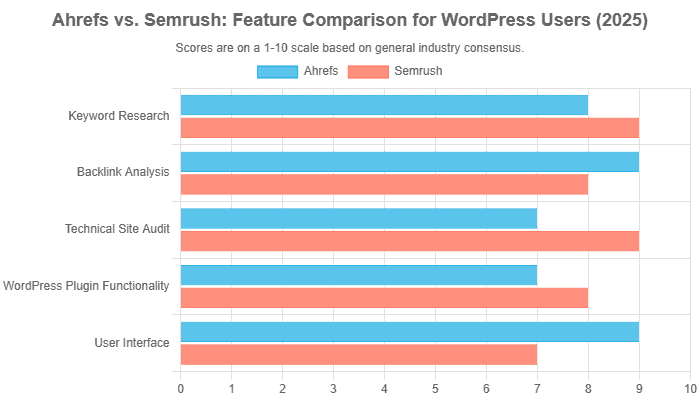
Verdict: The choice often comes down to a matter of focus. If your primary need is best-in-class backlink data and a robust content audit engine for existing posts, it is a phenomenal choice. If you need an all-in-one marketing suite with stronger on-page writing assistance built into WordPress and more comprehensive technical audit features, it often has the edge.
Content Optimization Tools: Surfer SEO & Clearscope
These tools answer the question: “What does it take to rank for this keyword?” They work by analyzing the top-ranking pages for a target query and providing data-driven recommendations on what your content should include. This includes suggested terms (based on NLP analysis), ideal word count, heading structure, and more.
Both Surfer SEO and Clearscope are leaders in their respective spaces. Their primary value lies in taking the guesswork out of on-page SEO. Instead of subjectively deciding what to write, you get a quantifiable “Content Score” that updates in real-time as you write.
Integration with WordPress: The killer feature for WordPress users is its direct integration. Both Surfer and Clearscope offer plugins that bring their content editor directly into your WordPress dashboard or Google Docs. This allows your writers to optimize content as they create it, ensuring every article is primed to rank before it’s even published.
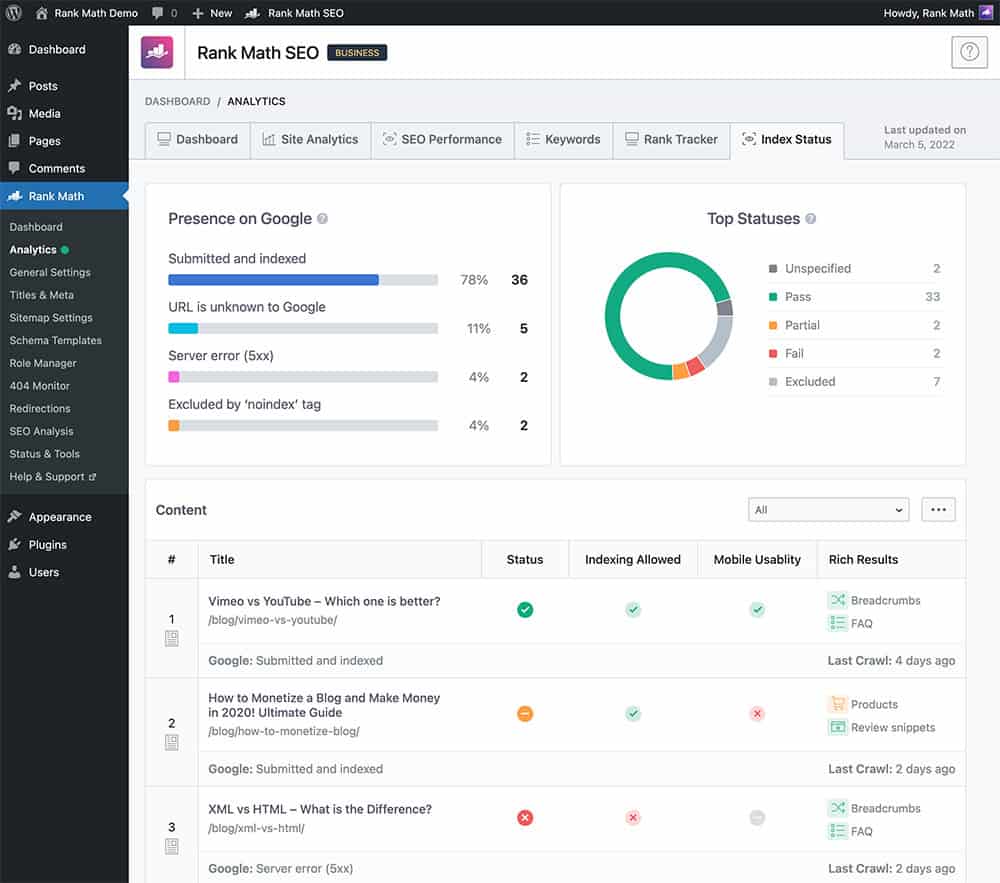
SEO plugins like Rank Math offer in-editor content analysis, similar to dedicated tools like Surfer SEO, providing real-time optimization guidance
SEO plugins like Rank Math offer in-editor content analysis, similar to dedicated tools like Surfer SEO, providing real-time optimization guidance
Technical SEO Crawlers: Screaming Frog
While all-in-one suites have site audit tools, for deep, granular technical analysis, nothing beats a dedicated desktop crawler, such as Screaming Frog SEO Spider. It’s the industry-standard tool for technical SEOs, capable of crawling your entire website to identify issues at scale.
WordPress Use Case: After conducting keyword research and mapping keywords to pages, you can use Screaming Frog to perform a bulk audit of your WordPress site. For example, you can crawl your site and instantly see a list of every single page’s title tag, meta description, H1, and word count. You can then export this data and cross-reference it with your keyword map to find pages that are missing optimizations, have duplicate titles, or are too thin. It’s an indispensable tool for turning a site-wide keyword strategy into an actionable task list.
How to Track Your Keyword Research ROI
Executing a keyword strategy is only half the battle. To justify the investment of time and resources, you must track your performance and measure the return on investment (ROI). This closes the feedback loop, allowing you to see what’s working, what isn’t, and where to focus your efforts. A data-driven approach turns SEO from a cost center into a predictable growth engine.
1. Keyword Rank Tracking
The most direct measure of success is whether you are ranking for your target keywords. While rankings can be a vanity metric if they don’t drive traffic, they are a critical leading indicator of your strategy’s effectiveness.
- Utilize the rank tracking features within all-in-one suites, such as Semrush or Ahrefs, or a dedicated tool like SE Ranking.
- Metrics to Track:
- Average Position: Monitor the average ranking for your basket of target keywords over time. A downward trend (e.g., from position 20 to 10) is a strong positive signal.
- SERP Feature Wins: Track how often you appear in featured snippets, “People Also Ask” boxes, or image packs. Winning these features can drive significant visibility even without a #1 ranking.
- Share of Voice: This metric, offered by some advanced tools, estimates your visibility across a set of keywords compared to your competitors.
2. Organic Traffic Growth
The ultimate goal of ranking is to drive qualified traffic to your WordPress site. Google Analytics 4 (GA4) is the essential tool for measuring this.
- Google Analytics 4.
- Metrics to Track:
- Organic Search Sessions & Users: In GA4, navigate to `Reports > Acquisition > Traffic acquisition`. Filter by the “Session default channel group” and select “Organic Search.” Monitor the trend of users and sessions over time.
- Landing Page Performance: Correlate traffic increases to specific landing pages with the content you recently optimized. If you optimized `yoursite.com/blog/wordpress-keyword-research` and see a spike in its organic traffic, your strategy is working.
3. Clicks, Impressions, and CTR
Google Search Console (GSC) provides invaluable data on how your site performs directly within Google’s search results, before a user even clicks.
- Google Search Console.
- Metrics to Track:
- Impressions: How many times your pages appeared in search volume results for specific queries. This is a measure of visibility.
- Clicks: How many times did users click through to your site?
- Click-Through Rate (CTR): The percentage of impressions that result in a click (Clicks / Impressions). A low CTR for a high-ranking keyword often indicates that your title tag and meta description are not compelling enough and require improvement.
4. Conversions & Business Value
This is the final and most crucial step: connecting SEO efforts to business revenue. This proves the tangible value of your keyword research.
- Google Analytics 4 with conversion tracking properly configured (e.g., tracking form submissions, product purchases, or newsletter sign-ups).
- Metrics to Track:
- Organic Conversions: Track the number of key events (conversions) attributed to the Organic Search channel.
- Calculating SEO ROI: The basic formula for ROI is: (Gain from Investment – Cost of Investment) / Cost of Investment. The “Gain from Investment” is the value of your organic conversions (e.g., average sale value multiplied by the number of sales from organic). The “Cost” includes tool subscriptions, content creation costs, and the time of employees and agencies. While it is complex to calculate perfectly due to attribution challenges, even a fundamental estimation provides powerful insights into the profitability of your SEO program. It’s generally recommended to measure SEO ROI for at least six months to a year to account for the time it takes to see results.

FAQ For WordPress Keyword Research
How do I add keywords to WordPress?
You add keywords to WordPress not by using a single “keyword” field, but by strategically placing them in key on-page SEO elements. Using an SEO plugin like Yoast, Rank Math, or AIOSEO, you should incorporate your primary keyword into the SEO Title, Meta Description, URL (Permalink), main Heading (H1), and subheadings (H2, H3). You should also use it naturally within the first paragraph of your content and in the alt text of relevant images. These plugins provide dedicated fields in the WordPress editor to simplify and guide this process.
What is the best keyword research tool for WordPress beginners?
For WordPress beginners, the best starting points are free and intuitive tools. WPBeginner’s Keyword Generator and AnswerThePublic are excellent tools for brainstorming content ideas and finding user questions, with no cost and a minimal learning curve. For those ready for a small investment, LowFruits is highly recommended because it specializes in finding low-competition keywords, which gives new sites a better chance to rank quickly.
How many keywords should I use in a WordPress post?
You should focus on one primary keyword (also called a “focus keyword” in Yoast) for each post or page. This primary keyword should be supported by several (e.g., 3-5) secondary or long-tail keywords that are semantically related. The goal is not to hit a specific keyword count or density, but to cover a topic comprehensively and naturally. Modern SEO algorithms penalize “keyword stuffing” and reward content that thoroughly satisfies user intent.
Can I do keyword research for free?
Yes, absolutely. You can build a very effective keyword research strategy using only free tools. Start with Google’s features, such as Autocomplete and “People Also Ask.” Then, use AnswerThePublic to visualize questions around your topic. For search volume estimates, Google Keyword Planner is the standard free tool. While paid tools offer more data and efficiency, these free methods provide a solid foundation for any WordPress site.
How does AI change keyword research for WordPress in 2025?
In 2025, AI fundamentally shifts keyword research from a focus on exact-match phrases to a deeper understanding of **semantic context and user intent**. AI-powered search, like Google’s AI Overviews, rewards comprehensive content that answers complex, conversational queries. Therefore, AI-driven keyword research involves using tools to identify topic clusters, predict emerging trends, and analyze which content formats best satisfy a user’s needs. For WordPress users, this means prioritizing the creation of in-depth, authoritative content that addresses a topic from multiple angles, as this is the material that AI models are designed to source and feature.
What’s the difference between a focus keyphrase in Yoast and a real keyword?
There is no functional difference; they are two terms for the same concept. A “real keyword” is the term or phrase you want to rank for. The “focus keyphrase” is simply the term you enter into the Yoast SEO (or Rank Math/AIOSEO) plugin’s analysis field. By entering your target keyword as the focus keyphrase, you activate the plugin’s real-time analysis, which then provides feedback and a checklist to ensure your content is optimized correctly for that specific keyword.
How do I find keywords my competitors are ranking for?
The most effective way to find competitor keywords is by using the “Keyword Gap” or “Content Gap” analysis features in SEO suites like Ahrefs. You enter your own domain and the domains of 2-3 of your top competitors. The tool will then generate a report showing the keywords that your competitors rank for, but you do not. This provides a proven list of content topics that are already working in your niche.
Your Path to WordPress Keyword Dominance
The digital landscape of 2025 is complex, but the path to visibility is more apparent than ever. It is paved not with tricks or shortcuts, but with a profound understanding of the user. This guide has demonstrated that keyword research is the essential discipline for gaining that understanding. It is the first and most critical step in a chain reaction that leads to higher rankings, qualified traffic, and measurable business growth.
Let’s distill our journey into its core principles:
- Intent is Everything: Shift your focus from what words people type to what problems they are trying to solve. Keyword research is your lens for seeing this intent.
- Process Over Panic: SEO success stems from a systematic and repeatable process. Follow the workflow: Research potential keywords, analyze their value, and implement them meticulously within your WordPress site.
- Leverage Your Tools: WordPress offers an incredible foundation. Amplify its power by using dedicated SEO plugins like Yoast, Rank Math, or AIOSEO to bridge the gap between your strategic research and on-page execution.
- Build Your Moat with Authority: Move Beyond Single-Page Rankings. Use your keyword research to build comprehensive topic clusters that establish you as the definitive expert in your field. This is your most durable competitive advantage.
- Measure to Improve: What gets measured gets managed. Use the tools at your disposal—Google Analytics, Google Search Console, and rank trackers—to monitor your progress, prove your value, and refine your strategy.
The task ahead may seem daunting, but the journey begins with a single step. Don’t try to overhaul your entire site all at once. Instead, take one key insight from this guide and apply it today. Choose one pillar topic and brainstorm its cluster content. Audit a single, significant page and re-optimize it based on fresh keyword research. By taking consistent, deliberate action, you can begin the process of transforming your WordPress website from just another voice on the web into an authoritative and trusted resource that dominates search results.
The foundation of SEO success for any WordPress website in 2025 is solid keyword research, a strategic shift that prioritizes search intent over outdated tactics. This critical process involves generating initial keyword ideas and then expanding the keyword list using various keyword research tools. While free tools like Google Keyword Planner (accessible via your Google Ads account) provide initial search volume data and keyword suggestions, investing in the best keyword research tools, such as Semrush or Ahrefs, is often necessary. Semrush’s Keyword Magic Tool, for instance, is an excellent tool for discovering a massive list of related keywords and similar keywords, while also helping to assess competition levels and low SEO difficulty opportunities.
The goal is to move beyond high search volume alone and identify the correct and relevant keywords—including valuable long-tail keywords—that align with user needs. Once the best keywords are identified, the next step is implementation. Using an SEO plugin like Yoast SEO, you can strategically optimize on-page elements. The main keyword or focus keyword must be integrated naturally into the article or post, including the meta tags and headings, directly within the WordPress editor.
By consistently creating high-quality new content centered around strategically targeted keywords and utilizing content optimization tools, site owners can effectively establish topical authority. This in-depth approach ensures their website is trusted by search engines, leading to higher search engine rankings and generating significantly more organic traffic. Ultimately, mastering keyword research is the key to achieving sustainable rankings and long-term ROI.

With over 27 years of hands-on SEO expertise, starting from my early days as a CFO. Quitting that job to build a top-ranked web hosting business in 1995, I’ve mastered WordPress optimization as a precise engineering discipline. Through extensive research, high-level consulting, and developing a WordPress site that achieved over a thousand organic Google rankings—culminating in a six-figure sale—I’ve decoded Google’s algorithm over 27 years to develop wordpress engineering that transforms underperforming WordPress sites into authoritative powerhouses. Business owners frustrated by stagnant traffic, low visibility, and missed opportunities find relief as I help them deliver measurable ROI through higher rankings, increased leads, and sustainable growth. As owner of dominant city-based SEO platforms in major U.S. markets, I outperform industry gurus, empowering entrepreneurs, local businesses, agencies, and marketers via my WordPress Optimization services at wordpressoptimization.com to unlock their site’s full potential.